


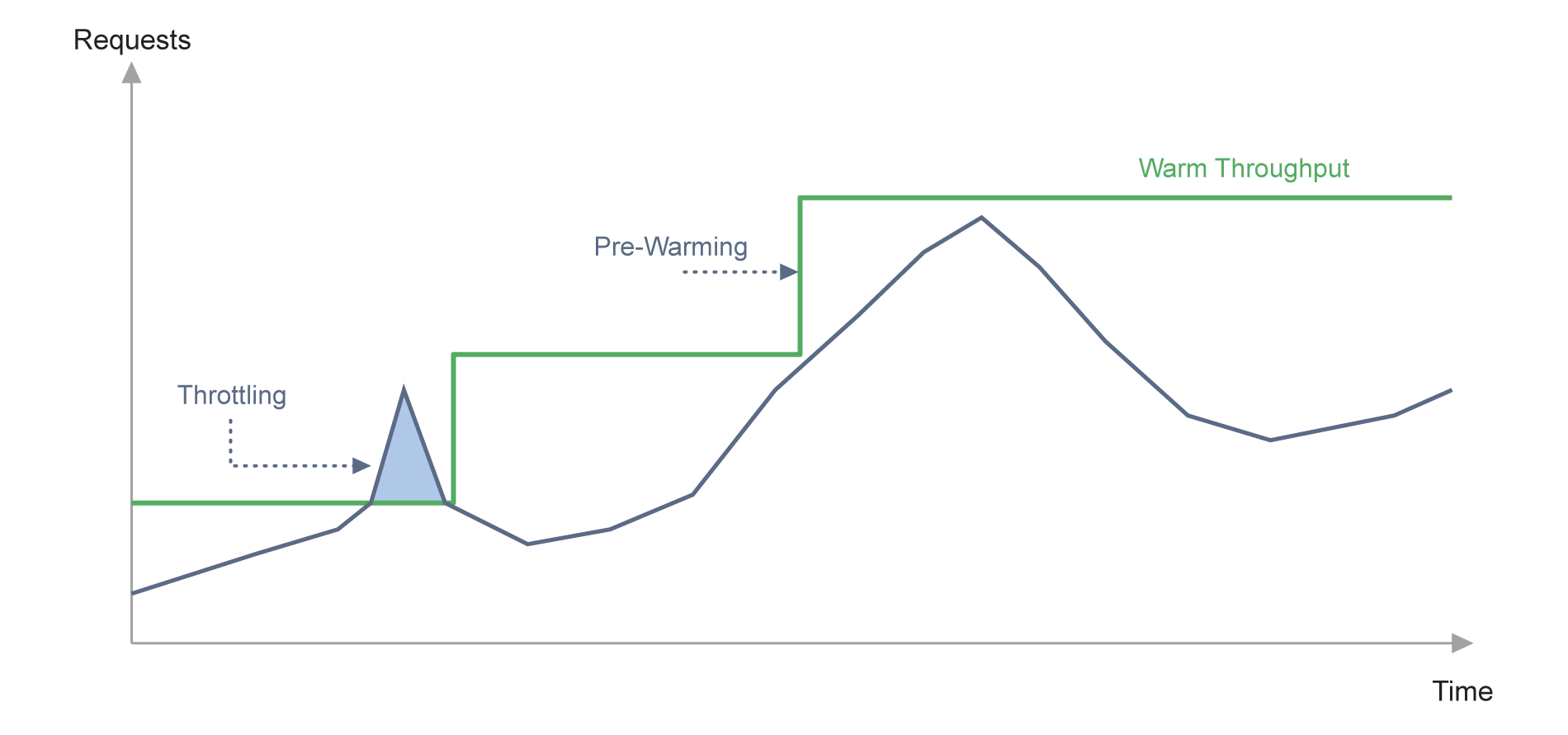
How Does DynamoDB Warm Throughput Work?
Every table starts with a baseline warm throughput value that depends on its capacity mode. A new on-demand table defaults to 12,000 read units per second and 4,000 write units per second. A provisioned table’s warm throughput starts at whatever read and write capacity units (RCUs and WCUs) were set at creation, and increases automatically any time provisioned capacity, or DynamoDB automatic scaling, raises it further. In both modes, warm throughput only ratchets upward: an AWS DynamoDB warm throughput value that reaches 50,000 RCU/s during a traffic spike stays at 50,000 RCU/s afterward, even if the workload’s steady-state need is a fraction of that.
Because warm throughput operates at the table and index level, it doesn’t override DynamoDB’s partition-level limits. Each partition is still capped at 3,000 read capacity units and 1,000 write capacity units per second, so a table with 30,000 RU/s of warm throughput and an uneven access pattern can still throttle individual requests well below its table-wide ceiling. Pre-warming a table changes what the table can absorb in aggregate; it doesn’t reshape how that traffic lands across partitions, which is why partition key design still matters as much after pre-warming as before it.
On-Demand vs. Provisioned: Default Warm Throughput Baselines
|
Aspect |
On-Demand Table |
Provisioned Table |
| Default read baseline | 12,000 RU/s | Table’s current RCU setting |
| Default write baseline | 4,000 WU/s | Table’s current WCU setting |
| Increases from | Traffic growth or manual pre-warming | Raising provisioned capacity, auto scaling, or manual pre-warming |
| Can it decrease? | No | No |
AWS DynamoDB Warm Throughput and Pre-Warming
AWS DynamoDB warm throughput becomes actionable through pre-warming: manually setting a table or index’s ReadUnitsPerSecond and WriteUnitsPerSecond ahead of a known event, either at creation or as an update to an existing table, through the console, CLI, CloudFormation, or the DynamoDB API. A team expecting a flash sale to push write traffic to 100,000 WCU/s, for example, can pre-warm the table to that value in advance rather than waiting for DynamoDB to detect the spike and scale reactively — a process that on-demand tables handle well for gradual growth but not for the kind of 10x-to-100x jump a launch event can produce in seconds.
Pre-warming is asynchronous and non-blocking, so a table remains available for reads and writes while it scales in the background, and a table’s GSIs can be pre-warmed independently of the base table. AWS’s own guidance is to set a GSI’s WriteUnitsPerSecond to at least match the base table, and higher still (up to 1.5 times the base table’s value) when the index’s key attributes change frequently, since every base table write that touches an indexed attribute becomes a write to the GSI as well. DynamoDB prewarming this way is also commonly used ahead of large migrations and bulk imports, where the destination table needs to absorb sustained write volume from the first record rather than throttling through a slow ramp-up
DynamoDB Warm Throughput vs. Provisioned Capacity and Automatic Scaling
Warm throughput sits alongside DynamoDB provisioned capacity and DynamoDB automatic scaling rather than replacing either. Provisioned capacity is the throughput a team commits to and pays for continuously; warm throughput is the throughput a table can currently absorb without throttling, whether that table is provisioned or on-demand. Raising provisioned capacity raises warm throughput as a side effect, but a team can also pre-warm a provisioned table’s index, or a global table replica, without changing its ongoing capacity mode at all, since default warm throughput carries no charge.
DynamoDB automatic scaling addresses a different problem: it adjusts provisioned capacity over time to track a target utilization ratio, using CloudWatch alarms that typically react on a multi-minute cadence. That reaction time is fine for gradual, hours-long traffic curves, but it’s exactly the gap pre-warming exists to close. A scaling policy that hasn’t triggered yet offers no protection against a spike that arrives before it does. Teams running warm throughput dynamodb workloads for known events generally use both together: automatic scaling for the traffic they can’t predict, and pre-warming for the traffic they can.
ScyllaDB vs. DynamoDB Warm Throughput: Elastic Scaling Without Pre-Warming
Warm throughput and pre-warming exist because DynamoDB’s scaling has a reaction time, and that reaction time gets tested against real traffic instead of predicted traffic. ScyllaDB takes a different approach to the same problem: its tablets data distribution rebalances data across the cluster in parallel when capacity changes, moving load in seconds rather than minutes, without a separate warm-up value to track, raise, or forget about after the event that required it has passed.
Because ScyllaDB doesn’t provision throughput per table, there’s no equivalent to a table-specific warm throughput baseline resetting itself higher and staying there. Capacity is a property of the cluster’s CPU cores and I/O, shared across every table on it, so a team preparing for a traffic surge scales the cluster rather than pre-warming a value in each affected table and its indexes individually. That also removes the specific operational task warm throughput requires: forecasting the multiplier, calculating the RCU/WCU target, and remembering to check whether GSIs were pre-warmed to match.
DynamoDB Warm Throughput Limitations Explained
Warm Throughput Only Increases
Once a table or index’s warm throughput rises, whether through organic traffic growth or manual pre-warming, it cannot be lowered. A table pre-warmed for a one-time launch is billed a one-time charge for the pre-warming operation itself, which matters for teams tracking dynamodb limitations around cost and capacity planning, since that baseline is also what future scaling and billing calculations start from.
Partition-Level Caps Still Apply
Table-level warm throughput doesn’t change the fact that any single partition tops out at 3,000 RCU/s and 1,000 WCU/s. A hot partition can throttle well before the table’s aggregate warm throughput is reached, so pre-warming a table with a skewed access pattern doesn’t fix the underlying hot-partition problem.
Maximum Throughput Settings Override It
An on-demand table with a configured maximum throughput ceiling will throttle at that ceiling regardless of its warm throughput value. A table with 30,000 RU/s of warm throughput but a 5,000 RRU maximum still throttles above 5,000, which makes the maximum throughput setting worth checking before assuming a pre-warmed table is protected.
No Cost-Free Way to Test It
Any warm throughput increase above the default baseline is billed at provisioned rates for the units it adds, whether or not the anticipated traffic materializes. Overestimating a launch’s demand means paying for capacity the table never uses.
Doesn’t Eliminate Forecasting
Pre-warming requires knowing the target number in advance: an estimate that’s too low under-protects the launch, and one that’s too high wastes spend. Warm throughput removes the scaling delay; it doesn’t remove the forecasting work.
DynamoDB Warm Throughput Pricing
DynamoDB warm throughput pricing only applies above the default baseline of 12,000 RU/s and 4,000 WU/s for a new on-demand table, or whatever a provisioned table’s current capacity already covers. Increases beyond that baseline are billed at standard provisioned rates for the added units, roughly $0.00065 per WCU and $0.00013 per RCU in us-east-1, regardless of whether the pre-warmed capacity is ever used.
Pre-warming a table from 10,000 to 40,000 WCU/s, for example, means paying for the additional 30,000 WCU at that rate (about $19.50) as a one-time charge for the increase operation itself, on top of whatever the table’s ordinary read and write costs are afterward. Because warm throughput values only go up, that $19.50 also becomes the table’s new cost floor going forward, so teams pre-warming for a single event are effectively paying for a permanently higher baseline, not a temporary boost.
ScyllaDB Costs vs. DynamoDB Warm Throughput Pricing
ScyllaDB doesn’t have a pre-warming charge because it doesn’t have a per-table throughput baseline to raise. Cluster capacity is priced by the compute and storage provisioned for the cluster as a whole, so preparing for a traffic surge means sizing the cluster for it, a cost that’s visible and predictable rather than calculated per table, per index, per read unit, and per write unit ahead of every anticipated spike. For teams that pre-warm DynamoDB tables regularly enough that it’s become a recurring line item before every launch, that’s a simpler cost model to plan around: one number to size, rather than several warm throughput values to calculate, request, and monitor across tables and their indexes.
DynamoDB Warm Throughput FAQs
What is DynamoDB warm throughput?
DynamoDB warm throughput is the number of reads and writes per second a table, GSI, or global table replica can instantly support without throttling, based on its historical scaling. It’s tracked automatically for every table at no cost, and it only increases over time, whether from organic traffic growth or a manual pre-warming request.
How do you pre-warm a DynamoDB table?
DynamoDB prewarming means setting a table or index’s ReadUnitsPerSecond and WriteUnitsPerSecond ahead of expected demand, through the AWS CLI, console, CloudFormation, or the DynamoDB API, either at table creation or as an update. The change is asynchronous, so the table stays available while it scales, and GSIs can be pre-warmed to a different value than their base table, with AWS recommending the GSI’s write value match or exceed it.
What’s the difference between warm throughput and DynamoDB provisioned capacity?
DynamoDB provisioned capacity is the throughput a table is billed for continuously; warm throughput is the throughput the table can currently absorb without throttling, which applies to both provisioned and on-demand tables. Raising provisioned capacity increases warm throughput, but warm throughput can also be raised on its own through pre-warming without changing a provisioned table’s billed capacity.
Does warm throughput replace DynamoDB automatic scaling?
No. DynamoDB automatic scaling adjusts provisioned capacity gradually in response to sustained utilization changes, which works well for slower traffic curves but reacts too slowly for a sudden spike. Warm throughput and pre-warming close that specific gap for traffic a team can anticipate; automatic scaling still handles the traffic that shows up unannounced.
What are DynamoDB warm throughput limitations?
The main DynamoDB limitations are that warm throughput values can only increase and never come back down, that table-level warm throughput doesn’t protect against partition-level hot spots, that a configured maximum throughput setting overrides warm throughput and throttles anyway, and that any increase above the default baseline is billed even if the anticipated traffic never arrives.
Related Resources
How to Reduce DynamoDB Costs: Expert Tips from Alex DeBrie: DynamoDB consultant Alex DeBrie shares where teams tend to get into trouble.
Understanding The True Cost of DynamoDB: Analyzing the impact of peaks, DAX, global tables, and other cost multipliers
The Hidden Insanity of DynamoDB Pricing: Learn how to navigate some of the sneakiest aspects of DynamoDB pricing.
How you should think about DynamoDB costs: An overview about how DynamoDB pricing works, then a few examples of how Alex DeBrie uses this to make decisions about DynamoDB costs.
Why AWS DynamoDB Costs Catch Teams Off Guard: From inevitable overprovisioning to the “on-demand” tax: why AWS DynamoDB costs are bloody hard to control.
Understanding DynamoDB Cost Spikes Through Real Usage Scenarios: Why real-world DynamoDB usage scenarios often lead to unexpected expenses.