


DynamoDB Auto Scaling FAQs
What is Auto Scaling in DynamoDB?
Auto scaling in DynamoDB is a feature that automatically manages a table’s read and write capacity to match the level of application traffic. Instead of manually adjusting capacity units to handle spikes or drops in workload, auto scaling dynamically tunes them based on demand.
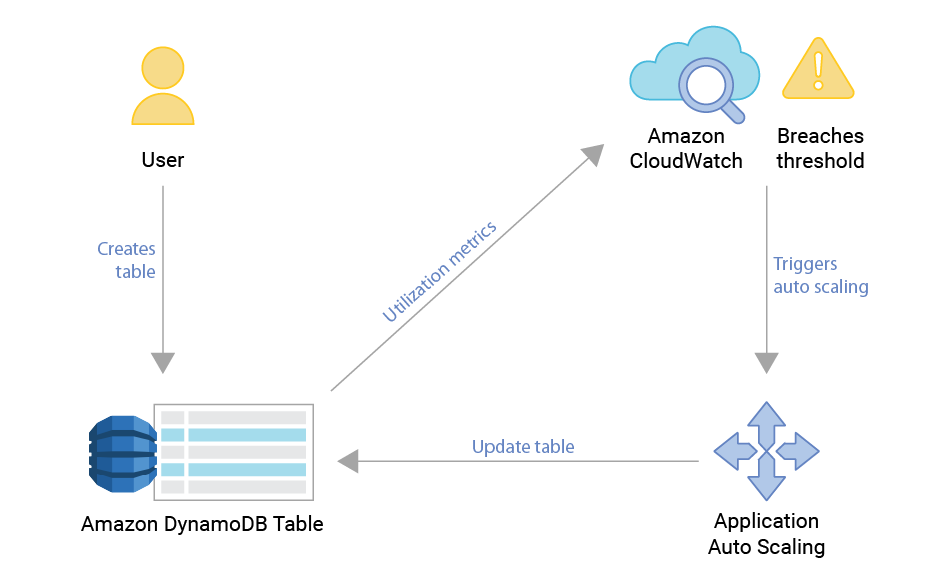
DynamoDB auto scaling relies on Amazon CloudWatch metrics and Application Auto Scaling policies. When usage consistently exceeds (or falls below) a target utilization threshold, DynamoDB increases (or decreases) provisioned capacity units. This ensures that your applications maintain reliable performance without over-provisioning, which helps reduce unnecessary costs.
For example, if an application experiences a sudden surge in traffic during peak business hours, auto scaling increases the provisioned throughput to try to minimize throttling. Later, when demand decreases, it scales capacity back down to avoid wasted resources. .
How DynamoDB Auto Scaling Works?
The function of autoscaling controllers is to try and preserve some function within a band of specified margins. Utilization is the ratio of available capacity (provisioned by the user or by AWS internal on-demand controller) and the capacity consumed by external workload.
Utilization = consumed capacity / available capacity
To do that, the controller will add or remove capacity to reach the target utilization based on the past data it has seen. However, adjusting capacity takes time, and the load might continue changing during that time; The controller is always risking adding too much capacity or too little in the time it takes between noticing the change in pattern and the change to become effective.
Another way to look at this is that the controller needs to “predict the future” and its prediction will be either too aggressive or too meek. Looking at the problem this way, it’s clear that the further into the future the controller needs to predict the greater the errors can be. In practice, this means that controllers need to be tuned to handle only a certain range of changes; a controller that handles rapid large changes will not handle slow changes or rapid small changes well. It also means that changes that are faster than the system response time (the time it takes the controller to add capacity) cannot be handled by the controller at all.
In the case of load spikes that rise sharply within a seconds or minutes all databases must handle the spikes using the already provisioned capacity — so a certain degree of overprovisioning must always be kept, possibly by a large amount if the anticipated bursts are rapid and large.
After an adjustment is triggered to satisfy a change in utilization, the database takes some time to adjust to the new requested level. .
Does DynamoDB Auto Scaling Make Sense?
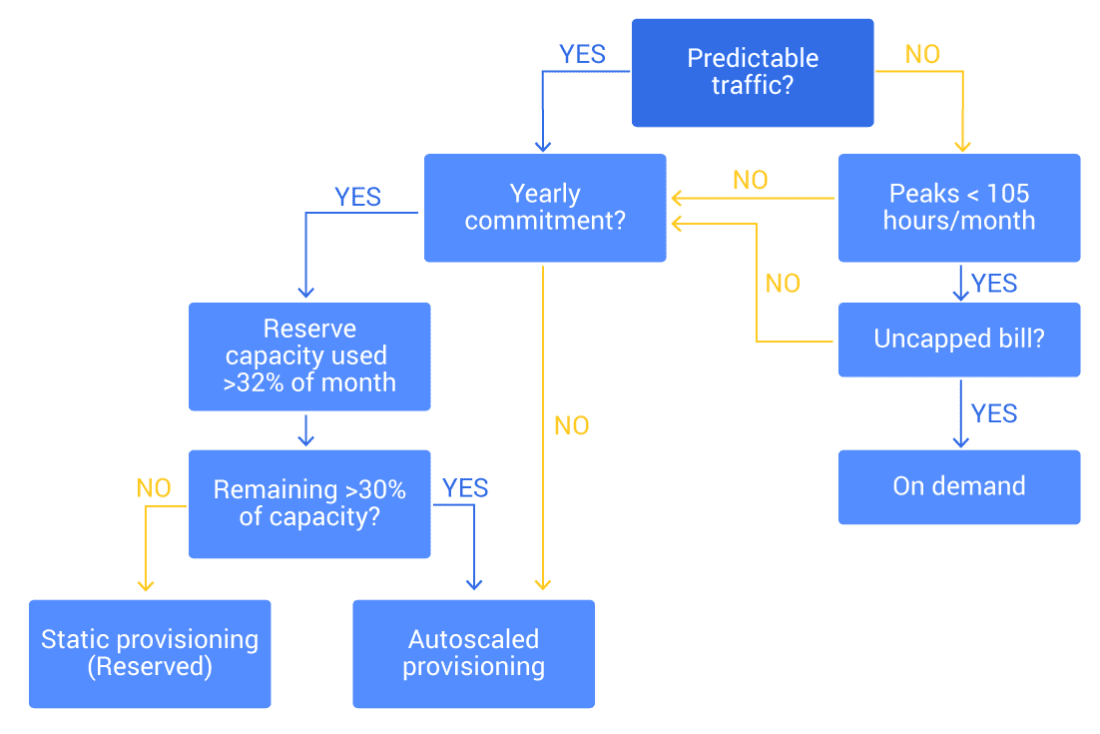
Making sense of the multitude of scaling options available for DynamoDB can be confusing. Here is a process to help you decide:
- Follow the flowchart below to decide which mode to use
- If you have historical data of your database load (or an estimate of load pattern), create a histogram or a percentile curve of the load (aggregate on hours used). This is the easiest way to observe how many reserved units to pre-purchase. As a rule of thumb, purchase reservations for units used over 32% of the time when accounting for partial usage and 46% of the time when not accounting for partial usage. Do keep in mind the cost associated with each option.
- When in doubt, opt for static provisioning unless your top priority is avoiding being out of capacity. Static provisioning means your table will always have capacity to handle workloads as they were defined. The downside of this approach is the extreme cost associated with it.
- Configure scaling limits (both upper and lower) for provisioned auto scaling. You want to avoid out-of-capacity during outages and extreme cost in case of rogue overload.
- Remember that the upper limit on DynamoDB on-demand billing is defined by the table’s scaling limit (which you may have requested raising for performance reasons). Make sure to configure billing alerts and respond quickly when they fire. You don’t want to get caught too far down on the road after a massive workload spike caused your table to grow to a really high capacity.
Why is DynamoDB Auto Scaling Used?
DynamoDB auto scaling aims to ensure that applications remain both highly available and cost-efficient in the face of unpredictable workloads.
Performance Consistency: Auto scaling attempts to prevent throttling during traffic spikes by automatically increasing read and write capacity. However, tables might take some time to adjust after a change – which may lead to latency spikes and the dreaded throttling impacting application performance.
Cost Optimization: When demand decreases, auto scaling reduces provisioned capacity.
Operational Simplicity: Managing capacity manually can be time-consuming and error-prone. Auto scaling automates this process.
Adaptability to Unpredictable Workloads: Modern applications often face variable traffic patterns (e.g., flash sales, seasonal events, or viral growth). Auto scaling helps adapt to these changes while minimizing application performance impact.
When is DynamoDB Auto Scaling Most Useful?
So when is autoscaling useful? If the load changes too quickly and violently, autoscaling will be slow to respond. If the change in load has low amplitude, adjusting capacity is insignificant. Autoscaling is most useful when:
- Load changes have high amplitude: The surge has gradual changes and covers a long period of time. Otherwise, the system tries to catch up to a workload that has receded
- The rate of change is in the magnitude of hours: If spikes happen too frequently, the system may not be able to tackle consecutive changes. Amazon DynamoDB allows for scaling down workloads up to 27 times a day
- The load peak is narrow relative to the baseline: If the change leads to a peak that lasts for multiple hours, it’s recommended to look closer into capacity planning. It might be the case that the table capacity is better off being statically managed.
Even if your workload is within those parameters, it is still necessary to do proper capacity planning in order to cap and limit the capacity that autoscaling manages, or else you are risking a system run amok.
DynamoDB Auto Scaling Best Practices
To get the most value from DynamoDB auto scaling, it’s important to configure and manage it thoughtfully. Following best practices helps ensure your tables and indexes scale smoothly with demand while trying to keep costs under control.
- Set Realistic Target Utilization
Configure target utilization (the percentage of provisioned capacity you want consumed before scaling occurs) based on workload characteristics. A typical starting point is ~70%. Tune if needed (the allowed range is ~20–90%). - Use On-Demand Mode for Spiky, Unpredictable Workloads
If your application traffic is highly variable and difficult to forecast, consider DynamoDB’s on-demand capacity mode. It automatically attempts to accommodate sudden spikes without manual tuning, though at a higher per-request cost. It may still throttle requests as it adjusts on the background though. - Monitor with CloudWatch
Leverage Amazon CloudWatch metrics (e.g., ConsumedReadCapacityUnits, ConsumedWriteCapacityUnits, and ThrottledRequests) to verify whether auto scaling is keeping up with demand. Monitoring helps you detect misconfigurations early. - Scale Global Secondary Indexes (GSIs) Separately
In provisioned mode, configure GSI auto scaling separately. In on-demand, GSIs inherit the mode. During backfill, ensure enough capacity; auto scaling applies after the Index is in ACTIVE state. Consider your workload’s read characteristics when estimating capacity for GSIs (for instance the ratio of reads to the base table vs reads to the GSI). Keep in mind that GSIs are monitored and therefore have scaling triggered separately. If the base table triggers a scaling to meet changing demands, it doesn’t necessarily mean the GSI will scale along with it as well. - Plan for Warm-Up Scenarios
Auto scaling policies adjust based on recent traffic patterns. For expected surges (like product launches or marketing campaigns), pre-scale capacity ahead of time or use scheduled scaling to avoid initial throttling. You can pre-scale with scheduled actions in Application Auto Scaling. - Balance Between Auto Scaling and Reserved Capacity
For predictable baseline workloads, you can combine auto scaling with reserved capacity to try to lock in costs. - Test and Adjust Regularly
Traffic patterns evolve over time. Periodically review and adjust auto scaling policies to ensure they remain aligned with current usage and business requirements.
DynamoDB Auto Scaling Challenges
While DynamoDB Auto Scaling offers major advantages, it is not without limitations. Understanding its challenges can help teams design more resilient and predictable systems.
- Scaling Reaction Time
Auto scaling reacts to changes in traffic based on CloudWatch alarms. This means there is often a lag between demand increase and capacity adjustment. During sudden spikes, applications may still experience throttling before the new capacity takes effect. - Unpredictable Spiky Workloads
Each GSI must be configured with its own scaling policies. If overlooked, GSIs can become bottlenecks or a waste of money, even if the base table is properly scaled. This adds operational complexity. - Complexity with Global Secondary Indexes (GSIs)
Leverage Amazon CloudWatch metrics (e.g., ConsumedReadCapacityUnits, ConsumedWriteCapacityUnits, and ThrottledRequests) to verify whether auto scaling is keeping up with demand. Monitoring helps you detect misconfigurations early. - Minimum and Maximum Capacity Limits
Auto Scaling operates within configured limits. If maximum capacity is set too low, the system cannot scale beyond it, leading to throttled requests. If minimum capacity is set too high, costs may increase unnecessarily. - Cold Start Scenarios
Scaling decisions are made based on recent usage. If a table has been idle and suddenly receives traffic, auto scaling may take time to adjust, resulting in initial throttling during warm-up periods. - Operational Visibility
Although CloudWatch provides metrics, diagnosing why auto scaling didn’t react as expected can be difficult. Teams may need to invest in additional monitoring and alerting to gain full visibility.
DynamoDB Auto Scaling vs Provisioned Capacity
| Feature | Auto Scaling | Provisioned Capacity |
|---|---|---|
| Capacity Management | Automatically adjusts capacity based on demand | Fixed user-defined capacity |
| Best For | Workloads with variable or unpredictable traffic | Steady, predictable workloads |
| Performance | May lag briefly during sudden spikes before scaling catches up | Consistent, but limited to provisioned units |
| Cost Efficiency | Optimizes spend by scaling down during low usage | Risk of over-provisioning or under-provisioning; constant capacity planning required |
| Operational Effort | Minimal; less manual tuning required | Requires ongoing monitoring and adjustments |
| Flexibility | High; adapts to workload fluctuations automatically | Low; capacity stays fixed regardless of demand |
DynamoDB Auto Scaling vs On Demand
| Feature | Auto Scaling (Provisioned Capacity + Scaling) | On-Demand Capacity Mode |
|---|---|---|
| Capacity Management | Scales provisioned read/write units up or down based on demand | No provisioning required; DynamoDB instantly accommodates requests |
| Best For | Workloads with predictable patterns that still fluctuate | Highly spiky or unpredictable workloads |
| Performance | May experience throttling if traffic spikes faster than scaling reacts | Handles sudden spikes instantly (no scaling lag) |
| Cost Model | Pay for provisioned capacity (can be more cost-efficient for steady workloads) | Pay per request (simpler, but massively more expensive at scale) |
| Operational Effort | Requires setting scaling policies, min/max limits, and monitoring | Minimal effort; completely hands-off |
| Flexibility | High, but bounded by configured limits | Maximum; DynamoDB automatically adapts to any traffic level |
Does ScyllaDB Address DynamoDB Auto Scaling?
Yes. ScyllaDB, a popular DynamoDB alternative, offers auto scaling in ScyllaDB X Cloud. Scaling can be triggered automatically based on storage capacity, CPU usage, or your knowledge of expected usage patterns.