


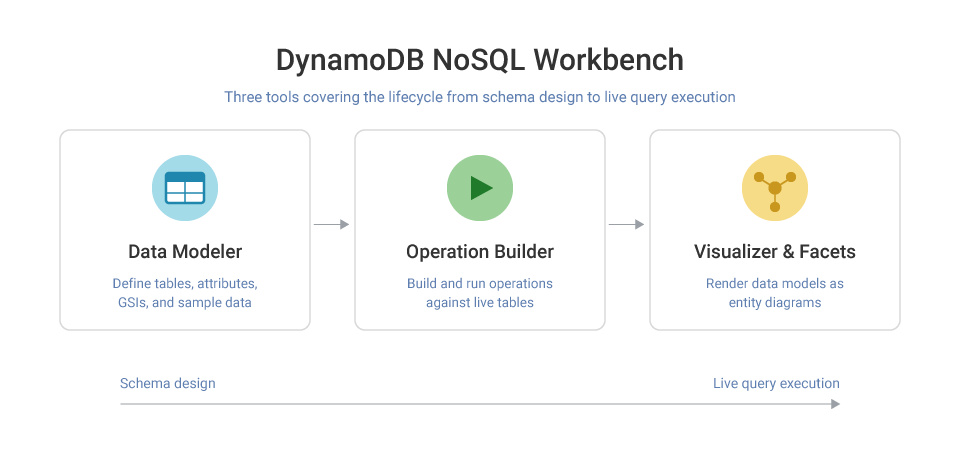
DynamoDB NoSQL Workbench Definition
DynamoDB NoSQL Workbench is a free, cross-platform GUI application from AWS for DynamoDB database development and operations. It is available for Windows, macOS, and Linux, and provides a visual environment for designing data models, building queries, and validating access patterns against sample data before deploying to AWS.
NoSQL Workbench for Amazon DynamoDB ships with DynamoDB local (a locally runnable version of the database) so engineers can design and test tables and indexes without connecting to an AWS account or incurring costs. The tool is organized into three components: a data modeler, an operation builder, and a visualizer with facets support.
AWS NoSQL Workbench exists because DynamoDB’s non-relational key-value model requires access patterns to be defined before the schema is designed — the inverse of how most relational database work happens. NoSQL Workbench makes that upfront design process visual and iterative, reducing the cost of schema mistakes before tables go to production.
How DynamoDB NoSQL Workbench Works
NoSQL Workbench for DynamoDB structures development across three tools that cover the full lifecycle from schema design to live query execution.
Data modeler
The data modeler is where you define tables, attributes, GSIs, and sample data. You can start from scratch or from one of several built-in sample models. Once tables are defined, you map access patterns to real DynamoDB operations — PutItem, UpdateItem, Query — and run them against your sample dataset to validate the model before committing it to DynamoDB local or your AWS account. Data models are exportable for team collaboration.
Operation builder
The operation builder is a graphical interface for building and running DynamoDB operations against live tables. It supports projection expressions and condition expressions, generates sample code in multiple languages, and allows direct table cloning between AWS regions or between DynamoDB local and a live account — useful for promoting schemas from development to production.
Visualizer and NoSQL workbench facets
The visualizer renders data models as entity diagrams and lets you define facets — named logical views over a single table that expose different entity types stored under shared key patterns. Facets are a documentation and modeling tool: they do not affect DynamoDB’s physical storage, but they make single-table designs significantly easier to communicate and audit across teams.
DynamoDB NoSQL Workbench Limitations
DynamoDB-only support
NoSQL Workbench is built exclusively for Amazon DynamoDB. It cannot connect to other NoSQL databases, does not support CQL or MongoDB wire protocols, and has no utility outside of the DynamoDB ecosystem. Teams running polyglot persistence architectures need separate tooling for every other database.
Does not eliminate capacity planning complexity
The operation builder helps validate access patterns, but how to connect aws NoSQL workbench to DynamoDB and run queries against a live table does not give you real production load behavior. Capacity planning, which helps in deciding how many RCUs and WCUs to provision still requires separate analysis. NoSQL Workbench validates query correctness, not throughput headroom.
Single-table design learning curve
NoSQL workbench facets and the data modeler assume you already understand DynamoDB’s single-table design paradigm. For teams coming from relational databases, the tool does not abstract the learning curve — it visualizes a model you still need to design correctly. Incorrectly designed access patterns committed through NoSQL Workbench cause the same throttling and hot-partition problems in production as any other DynamoDB schema error.
Local testing gaps
DynamoDB local, bundled in aws NoSQL workbench, does not replicate all DynamoDB behavior. Global tables, TTL behavior, DynamoDB Streams, and some IAM-related behaviors differ between DynamoDB local and the managed service. Test results from the local environment do not always predict production behavior, particularly for event-driven and multi-region architectures. .
Designing for DynamoDB, Deploying to ScyllaDB
ScyllaDB is a NoSQL database that is API-compatble with DynamoDB. It can run on your own infrastructure or any cloud – not just \AWS.
Everything you build in NoSQL Workbench ( schema, GSIs, access patterns, generated SDK code) carries over to ScyllaDB with a one-line change: swap the endpoint. You keep the design tool and the DynamoDB API you already know, and get out from under three specific DynamoDB constraints: item size, tail latency, and RCU/WCU billing.
What Changes When You Deploy to ScyllaDB Instead of DynamoDB:
- No 400 KB item ceiling. DynamoDB caps every item at 400 KB, attribute names included — schemas that need S3 offloading or attribute compression to work around it don’t need that on ScyllaDB.
- No shared-tenant latency variance. ScyllaDB’s shard-per-core design gives each CPU core its own memory and I/O queues instead of sharing them across tenants. ScyllaDB’s published benchmarks show single-digit-millisecond P99s under load; your results depend on data model and hardware.
- No per-request billing. ScyllaDB charges per node, not per RCU/WCU. At high sustained throughput this can cost less than DynamoDB’s metered model — model the crossover against your own traffic, don’t assume it.
Cost savings
ScyllaDB guarantees at least 50% cost savings on equivalent workloads migrating off DynamoDB. The resource-based pricing model eliminates the engineering overhead of capacity planning, throttling monitoring, auto scaling configuration, and hot partition troubleshooting — work that consumes ongoing engineering time under DynamoDB’s provisioned capacity model. Since ScyllaDB is DynamoDB API-compatible, teams can benchmark existing workloads directly against a ScyllaDB cluster using their current application code before committing to migration.
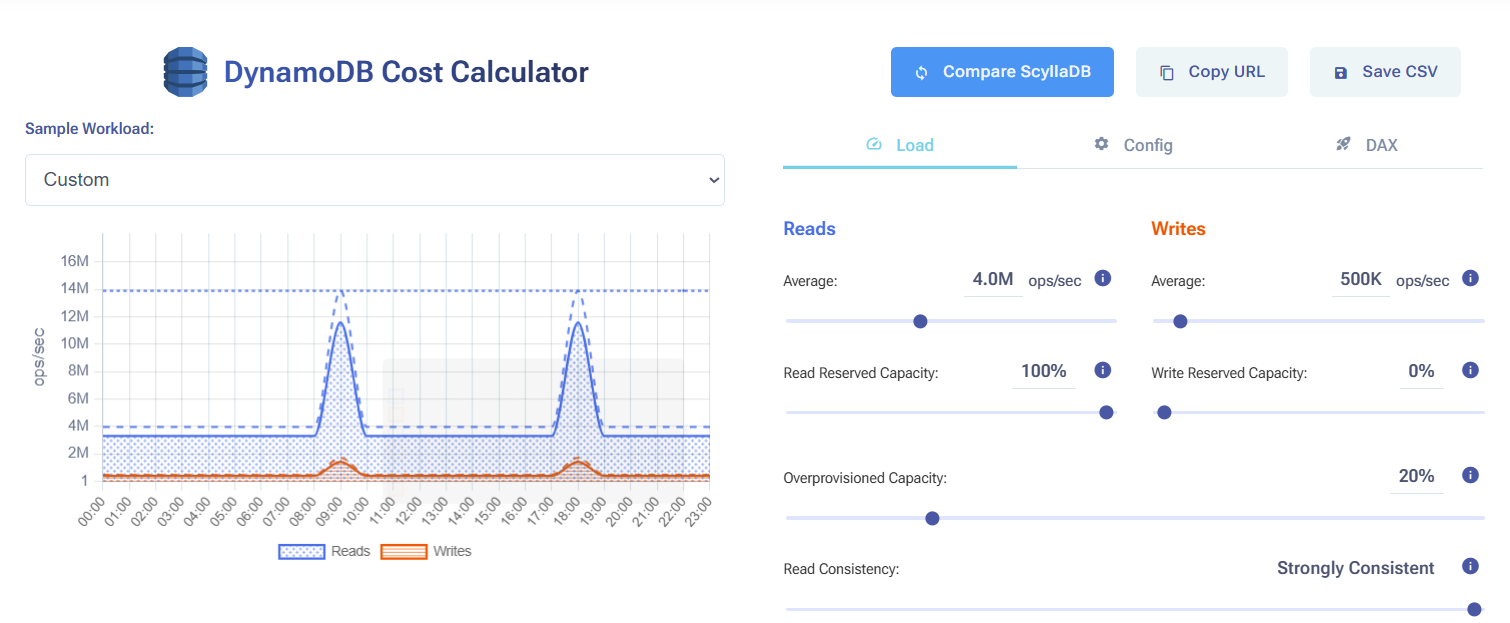
Compare ScyllaDB costs vs DynamoDB costs in this interactive calculator
DynamoDB NoSQL Workbench FAQs
What is DynamoDB NoSQL Workbench?
DynamoDB NoSQL Workbench is a free GUI tool from AWS for designing DynamoDB data models, building queries, and validating access patterns. It includes DynamoDB local for offline development and runs on Windows, macOS, and Linux. It is purpose-built for DynamoDB’s single-table design patterns and does not support other databases.
How do I download NoSQL Workbench for Amazon DynamoDB?
NoSQL Workbench for Amazon DynamoDB download is available free from the AWS documentation site. Select the installer for your operating system. DynamoDB local is bundled — no separate install needed. Java Runtime Environment (JRE) 17.x or newer is required. Linux users on Ubuntu also need libfuse2 and curl installed as prerequisites.
How do I connect NoSQL Workbench to DynamoDB?
To use NoSQL Workbench connect to AWS DynamoDB, open the Operation Builder and click ‘Add connection’. Select ‘Remote’ for a live AWS account and provide your AWS region, access key ID, and secret access key — or reference an existing AWS CLI profile. For local testing, select ‘DynamoDB local’ and use the default port 8000; no AWS credentials are required.
What are NoSQL Workbench facets?
NoSQL Workbench facets are logical views defined on a single DynamoDB table. Because single-table design stores multiple entity types in one table using shared partition and sort key patterns, facets let you define how each entity type is presented and queried — without creating separate physical tables. Each facet maps to a subset of items using key pattern filters, making complex single-table schemas easier to document and manage.
What is a NoSQL Workbench alternative?
A NoSQL workbench alternative depends on what you’re trying to solve. If the goal is a richer GUI experience for DynamoDB, tools like DBeaver and TablePlus offer limited DynamoDB support. If the goal is to eliminate the operational complexity that makes NoSQL Workbench necessary — capacity planning, access pattern rigidity, single-table constraints — ScyllaDB is the most common alternative. ScyllaDB’s DynamoDB-compatible Alternator API lets teams migrate existing DynamoDB applications with minimal code changes.
Related Resources
How to Reduce DynamoDB Costs: Expert Tips from Alex DeBrie: DynamoDB consultant Alex DeBrie shares where teams tend to get into trouble.
Understanding The True Cost of DynamoDB: Analyzing the impact of peaks, DAX, global tables, and other cost multipliers
The Hidden Insanity of DynamoDB Pricing: Learn how to navigate some of the sneakiest aspects of DynamoDB pricing.
How you should think about DynamoDB costs: An overview about how DynamoDB pricing works, then a few examples of how Alex DeBrie uses this to make decisions about DynamoDB costs.
Why AWS DynamoDB Costs Catch Teams Off Guard: From inevitable overprovisioning to the “on-demand” tax: why AWS DynamoDB costs are bloody hard to control.
Understanding DynamoDB Cost Spikes Through Real Usage Scenarios: Why real-world DynamoDB usage scenarios often lead to unexpected expenses.