


AWS DynamoDB WCU Cost Explained
In DynamoDB provisioned mode, you pay for the number of WCUs you allocate, whether you use them fully or not. A DynamoDB provisioned write capacity unit costs $0.00065 per WCU-hour — five times more expensive than the equivalent read capacity. This asymmetry makes write cost optimization a higher-priority concern in most DynamoDB workloads.
The following factors can increase how many DynamoDB write capacity units are consumed:
- Larger item sizes (rounded up to the nearest 1 KB)
- Transactional write operations (2 WCUs per write instead of 1)
- Conditional writes (failed conditions still consume write capacity)
- Secondary index updates (writes to Global Secondary Indexes consume WCUs according to the Item’s Projected Attributes size)
- Multi-region replication (Global Tables require provisioning and paying for WCU capacity in every replica region)
In on-demand mode, DynamoDB replaces WCUs with Write Request Units (WRUs) — the same 1 KB-per-write mechanic applies, but billing is per-request rather than per-hour. On-demand pricing carries a premium over equivalent provisioned write capacity rates, making it better suited for unpredictable workloads than high-volume steady-state writes.
How to Calculate DynamoDB WCU
To calculate DynamoDB WCUs, you need to account for item size and write operation type.
Step 1: Round item size up in 1 KB chunks
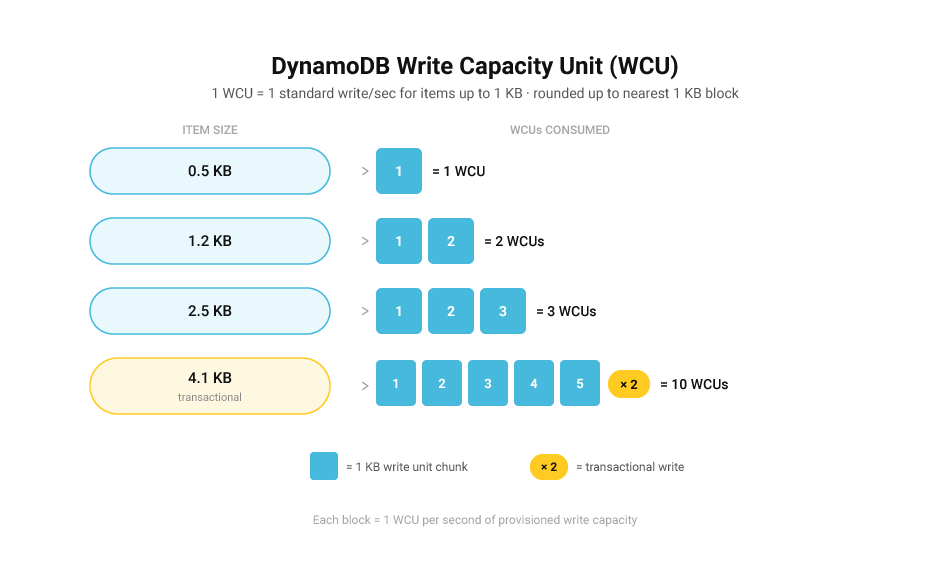
DynamoDB write capacity is calculated in 1 KB increments. Item size is rounded up to the nearest whole number:
- 1–1,024 bytes = 1 “write unit chunk”
- 1,025–2,048 bytes = 2 chunks
- 2,049–3,072 bytes = 3 chunks
- …and so on.
Step 2: Apply write type rules
For each 1 KB chunk:
- Standard write = 1 WCU
- Transactional write = 2 WCUs (transactions require double the capacity of a standard write)
- Conditional write (success) = 1 WCU + 1 RCU (reads are used to check the condition)
- Conditional write (failed condition) = 1 WCU + 1 RCU — failed conditions still consume capacity
Example WCU calculations
Example A: 512-byte item, standard write
- Size chunk: 1 (rounds up to 1 KB)
- Standard write: 1 WCU per write/sec
Total: 1 WCU
Example B: 2.5 KB item, standard write
- Size chunk: 3 (2,560 bytes rounds up to 3 KB)
- Standard write: 3 WCUs per write/sec
Total: 3 WCUs
Example C: 1 KB item, transactional write
- Size chunk: 1
- Transactional: 2 WCUs per write/sec
Total: 2 WCUs
Example D: 4.1 KB item, transactional write
- Size chunk: 5 (4,198 bytes rounds up to 5 KB)
- Transactional: 2 WCUs × 5 chunks = 10 WCUs per write/sec
Total: 10 WCUs
This is why DynamoDB WCU throttling and cost surprises are common: a moderate increase in average item size can multiply write costs immediately, and transactional workloads can double them.
ScyllaDB Pricing Model vs DynamoDB Write Capacity Units Pricing
DynamoDB and ScyllaDB use fundamentally different pricing approaches that reflect their architectural differences.
DynamoDB’s capacity-based pricing
In provisioned mode, DynamoDB charges for allocated WCUs whether they’re fully used or not. In on-demand mode, writes are charged per Write Request Unit at a premium rate. Writes cost 5x more than consistent reads in any capacity mode. Both models require separate provisioning and budgeting for read versus write capacity, with additional costs for secondary indexes, transactional operations, and multi-region replication. Overprovisioned write capacity on one table cannot be shared with other tables on the account — all WCU costs are attributed separately per table.
ScyllaDB’s resource-based pricing
ScyllaDB charges based on cluster resources (CPU cores and storage) rather than request units. Read-heavy and write-heavy workloads cost the same for equivalent throughput. Performance and pricing scale linearly with cluster size. Unlike DynamoDB, cluster sizing is not directly influenced by item size, write operation type, or the read/write split of your workload.
Cost impact
ScyllaDB guarantees savings of at least 50% on equivalent workloads migrating off DynamoDB. The resource-based model eliminates the operational overhead of capacity planning, DynamoDB WCU throttling monitoring, autoscale management, and hot partition troubleshooting — engineering tasks that consume ongoing time under DynamoDB’s WCU model. Tables from different workloads can be consolidated onto a single cluster, sharing resources and enabling further cost savings.
DynamoDB RCU vs WCU
DynamoDB WCUs and RCUs are the two throughput currencies DynamoDB uses to allocate performance. They differ in the operation type they govern, the item size thresholds they use, and their relative cost.
Key differences:
- WCU controls write throughput; RCU controls read throughput
- 1 WCU = 1 standard write per second for items up to 1 KB; 1 RCU = 1 strongly consistent read per second for items up to 4 KB
- Writes cost 5x more than reads — a WCU costs $0.00065/hr vs $0.00013/hr per RCU
- Transactional writes consume 2 WCUs per 1 KB; transactional reads consume 2 RCUs per 4 KB
- WCU consumption is driven by write volume and item size; RCU consumption also varies by read consistency level (strongly consistent vs eventually consistent)
In practice, your workload may be write-heavy (event ingestion, telemetry, IoT pipelines) or read-heavy (dashboards, session lookups, feed views). DynamoDB forces you to size and pay for both dimensions separately. Cost planning becomes further complicated when secondary indexes are involved, since Global Secondary Indexes carry their own write capacity requirements.
DynamoDB Item Size and WCU
DynamoDB WCU costs scale directly with item size. DynamoDB charges based on the size of each item written, rounded up to the nearest 1 KB block. If your items exceed 1 KB, additional WCUs are consumed proportionally.
Unlike reads (where the 4 KB block size provides more headroom), the 1 KB write block size means item size has an outsized impact on write costs. A single attribute added to each item — a timestamp, a metadata field, a new enum value — can push items across a 1 KB boundary and immediately increase WCU consumption across your entire write workload.
Attribute names within an Item also affect the total Item size. If documents or JSON are stored in Binary format, every bite of the original content is stored. The general recommendation is to compress the document before writing it to DynamoDB.
For example:
If you write an item that is 800 bytes, you consume 1 WCU per write.
If you write an item that is 1,200 bytes, you consume 2 WCUs per write — because the item is rounded up from 1,200 bytes to 2 KB.
At 10,000 writes per second, the difference between a 900-byte item and a 1,100-byte item is 10,000 additional WCUs per second — roughly $4,680/month in additional provisioned write capacity.
How ScyllaDB Addresses DynamoDB WCU Limitations
DynamoDB’s Write Capacity Unit model requires teams to provision write capacity in advance, monitor throttling when limits are exceeded, and pay separately for read and write throughput. ScyllaDB takes a fundamentally different approach.
- No throttling from WCU limits: In DynamoDB provisioned mode, exceeding allocated WCUs triggers ProvisionedThroughputExceededException and ThrottlingException errors. ScyllaDB charges based on cores and storage rather than request units — there is no provisioned write capacity to exhaust and no DynamoDB WCU throttling equivalent.
- No separate read and write pricing: DynamoDB writes cost five times more than reads, requiring separate provisioning and budgeting for WCUs and RCUs. With ScyllaDB’s resource-based model, write-heavy and read-heavy workloads cost the same; pricing reflects cluster size, not operation type.
- Simplified write cost planning: DynamoDB forces teams to overprovision WCUs to avoid throttling, paying for peak write capacity during low-traffic periods. ScyllaDB guarantees 50% cost savings on equivalent DynamoDB workloads, with pricing based on deployed cluster resources rather than write request units consumed.
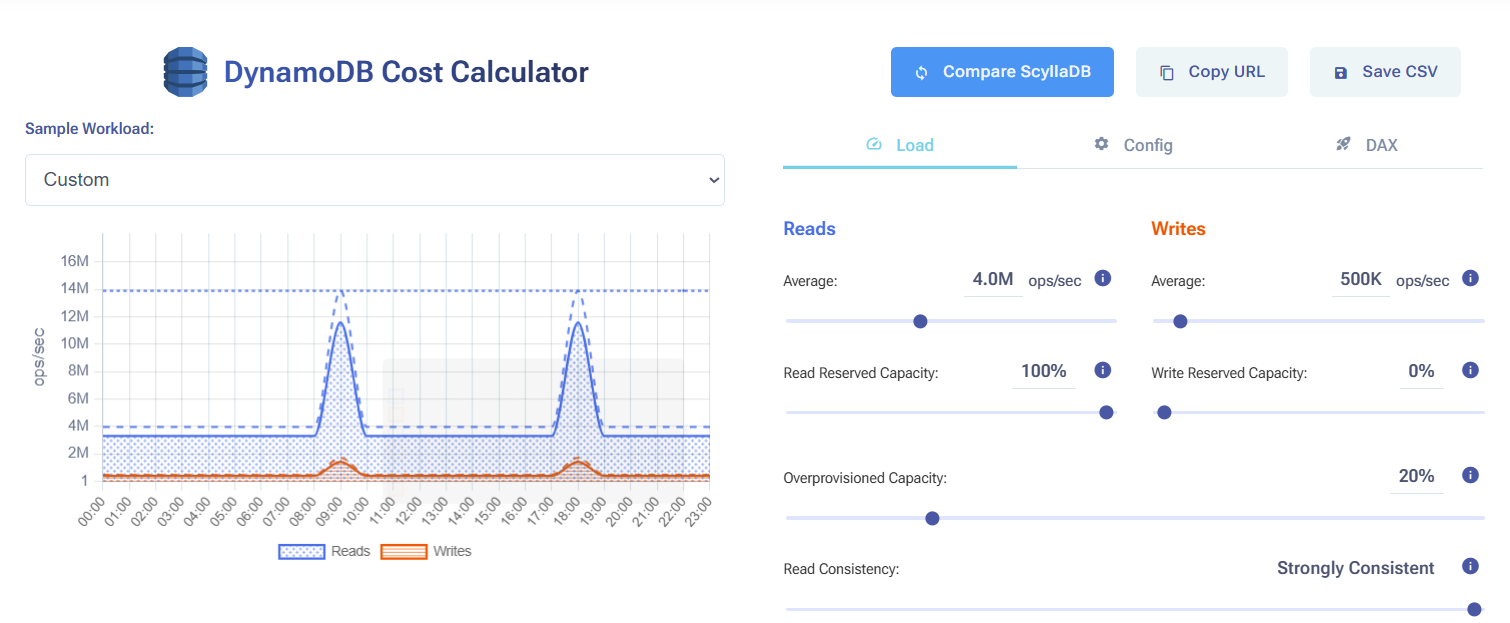
Compare ScyllaDB costs vs DynamoDB costs in this interactive calculator
Related Resources
How to Reduce DynamoDB Costs: Expert Tips from Alex DeBrie: DynamoDB consultant Alex DeBrie shares where teams tend to get into trouble.
Understanding The True Cost of DynamoDB: Analyzing the impact of peaks, DAX, global tables, and other cost multipliers
The Hidden Insanity of DynamoDB Pricing: Learn how to navigate some of the sneakiest aspects of DynamoDB pricing.
How you should think about DynamoDB costs: An overview about how DynamoDB pricing works, then a few examples of how Alex DeBrie uses this to make decisions about DynamoDB costs.
Why AWS DynamoDB Costs Catch Teams Off Guard: From inevitable overprovisioning to the “on-demand” tax: why AWS DynamoDB costs are bloody hard to control.
Understanding DynamoDB Cost Spikes Through Real Usage Scenarios: Why real-world DynamoDB usage scenarios often lead to unexpected expenses.