



Learn how ScyllaDB Vector Quantization shrinks your vector index memory by up to 30x for cost-efficient, real-time AI applications
Earlier this year, ScyllaDB launched integrated Vector Search, delivering sub-2ms P99 latencies for billion-vector datasets. However, high-dimensional vectors are notoriously memory-hungry. To help with memory efficiency, ScyllaDB recently introduced Vector Quantization. This allows you to shrink the index memory footprint for storing vectors by up to 30x (excluding index structure) without sacrificing the real-time performance ScyllaDB is known for.
What is Quantization?
To understand how we compress massive AI datasets, let’s look to the fundamentals of computer science. As Sam Rose explains in the ngrok blog on quantization, computers store numbers in bits, and representing high-precision decimal numbers (floating point) requires a significant number of them. Standard vectors use 32-bit floating point (f32) precision, where each dimension takes 4 bytes.
Quantization is the process of compromising on this “floating point precision” to save space. By sacrificing some significant figures of accuracy, we can represent vectors as smaller 16-bit floats or even 8-bit or 1-bit integers. As Sam notes, while this results in a “precision compromise,” modern AI models are remarkably robust to this loss of information. They often maintain high quality even when compressed significantly.
The Trade-off: Memory vs. Accuracy
In ScyllaDB 2026.1, quantization is an index-only feature. The original source data remains at full precision in storage, while the in-memory HNSW index is compressed. This allows you to choose the level of “information loss” you are willing to accept for a given memory budget:
| Level | Bytes/Dim | Memory Savings | Best For |
|---|---|---|---|
| f32 (default) | 4 | 1x (None) | Small datasets, highest possible recall. |
| f16 / bf16 | 2 | ~2x | Good balance of accuracy and memory. |
| i8 | 1 | ~4x | Large datasets with moderate recall loss. |
| b1 | 0.125 | ~32x | Maximum savings for massive datasets. |
CRITICAL NOTE: Quantization only compresses the vector data itself. The HNSW graph structure (the “neighbor lists” that make search fast) remains uncompressed to ensure query performance. Because of this fixed graph overhead, an i8 index typically provides a total memory reduction of ~3x rather than a raw 4x.
Calculating Your Memory Needs
To size your ScyllaDB Vector Search cluster effectively, be sure to consider both vector data and graph overhead. The total memory required for a vector index can be estimated with this formula:
Memory ≈ N * (D * B + m * 16) * 1.2
- N: Total number of vectors.
- D: Dimensions (e.g., 768 or 1536).
- B: Bytes per dimension based on quantization level (f32=4, i8=1, b1=0.125).
- m: Maximum connections per node (default 16).
- 1.2: 20% operational headroom for system processes and query handling.
Example: 10 Million OpenAI Embeddings (768 Dimensions)
Using this formula, let’s see how quantization affects your choice of AWS EC2 instances on ScyllaDB Cloud (which primarily utilizes the r7g Graviton and r7i Intel families):
- f32 (No Quantization): Requires ~40 GB RAM. You would need an r7g.2xlarge (64 GB) to ensure headroom.
- i8 Quantization: Requires ~12 GB RAM. You can comfortably drop to an r7g.xlarge (32 GB).
- b1 (1-bit): Requires ~4 GB RAM. This fits on a tiny r7g.medium (8 GB).
By moving from f32 to i8, you can drop 2-3 instance tiers. This gets you significant cost savings.
Improving Accuracy with Oversampling and Rescoring
To mitigate the accuracy loss from quantization, ScyllaDB provides two complementary mechanisms. Oversampling retrieves a larger candidate set during the initial index search, increasing the chance that the true nearest neighbors are included. When a client requests the top K vectors, the algorithm retrieves ceiling(K * oversampling) candidates, sorts them by distance, and returns only the top K. A larger candidate pool means better recall without any extra round-trips to the application. Even without quantization, setting oversampling above 1.0 can improve recall on high-dimensionality datasets.
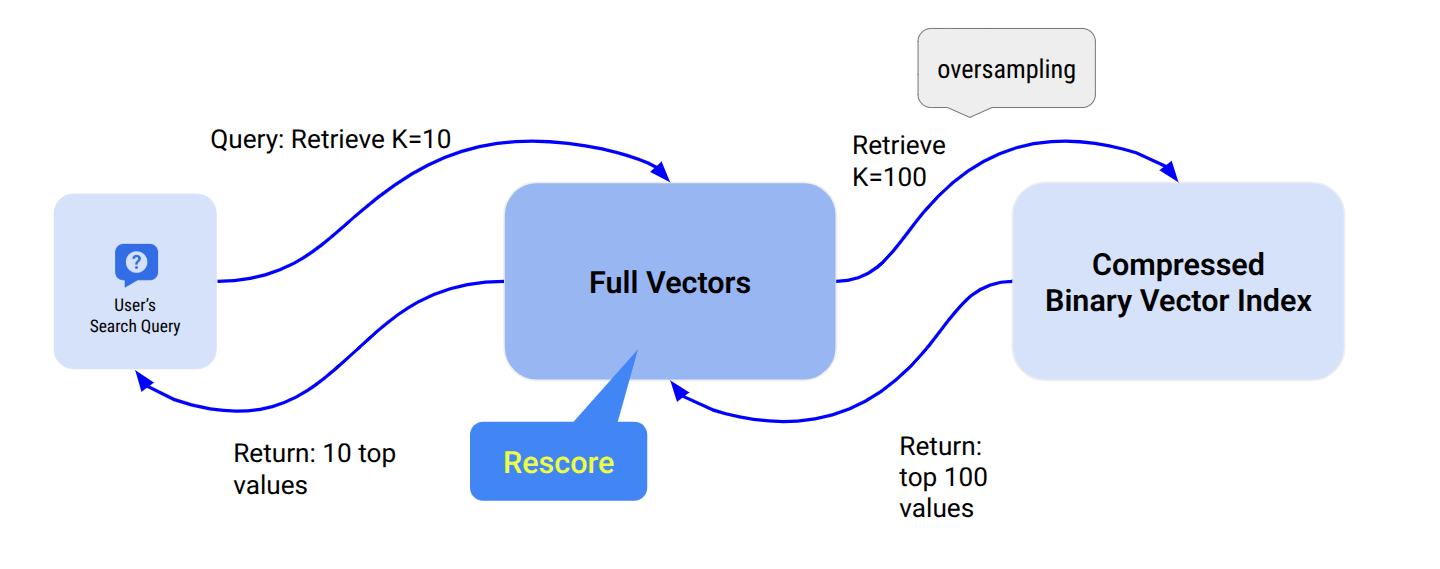
Rescoring is a second-pass operation that recalculates distances using the original full-precision vectors stored in ScyllaDB, then re-ranks candidates before returning results. Because it must fetch and recompute exact distances for every candidate, rescoring can reduce search throughput by roughly 2x – so enable it only when high recall is critical. Note that rescoring is only beneficial when quantization is enabled; for unquantized indexes (default f32), the index already contains full-precision data, making the rescoring pass redundant.
Both features are configured as index options when creating a vector index:
CREATE CUSTOM INDEX ON myapp.comments(comment_vector)

USING 'vector_index'

WITH OPTIONS = {

'similarity_function': 'COSINE',

'quantization': 'i8',

'oversampling': '5.0',

'rescoring': 'true'

};
When (and When Not) to Use Quantization
Use quantization when:
- You are managing millions or billions of vectors and need to control costs.
- You are memory-constrained but can tolerate a small drop in recall.
- You are using high-dimensional vectors (≥ 768), where the savings are most pronounced.
Avoid quantization when:
- You have a small dataset where memory is not a bottleneck.
- Highest possible recall is your only priority.
- Your application cannot afford the ~2x throughput reduction that comes with rescoring—the process of recalculating exact distances using the original f32 data to improve accuracy.
Choosing the Right Configuration for Your Scenario
Here are some guidelines to help you select the right configuration:
| Scenario | Recommendation |
|---|---|
| Small dataset, high recall required | Use default f32 — no quantization needed. |
| Large dataset, memory-constrained | Use i8 or f16 with oversampling of 3.0–10.0. Add rescoring: true only if very high recall is required. |
| Very large dataset, approximate results acceptable | Use b1 for maximum memory savings. Enable oversampling to compensate for accuracy loss. |
| High-dimensionality vectors (≥ 768) | Consider oversampling > 1.0 even with f32 to improve recall. |
Try ScyllaDB Vector Search Now
Quantization is just one part of the ScyllaDB 2026.1 release, which also includes Filtering, Similarity Values, and Real-Time Ingestion. With these tools, you can build production-grade RAG applications that are both blazingly fast and cost-efficient.
Vector Search is available in ScyllaDB Cloud.
- Get Started: Check out the Quick Start Guide to Vector Search in ScyllaDB Cloud.
- Deep Dive: Read our past posts on building a Movie Recommendation App or our 1-billion vector benchmark.
- Documentation: View the full ScyllaDB Cloud Vector Search Documentation.
Try ScyllaDB Cloud for free today and see how quantization can supercharge your AI infrastructure.