


Key Components of Redis Cache Architecture
A Redis cache deployment is built from a handful of core pieces: the in-memory key-value store itself, an optional persistence layer, a cluster/sharding layer for scaling past a single node, and client-side logic for handling cache misses and invalidation. The key-value store holds data as strings, hashes, lists, sets, and sorted sets, all addressed by key and optionally tagged with a TTL.
Persistence is optional and configurable: RDB snapshotting periodically writes the full dataset to disk, while append-only file (AOF) logging records every write operation so state can be reconstructed after a crash or restart. Neither mechanism changes the fact that reads and writes during normal operation happen entirely in RAM — persistence exists for recovery, not for extending capacity beyond memory.
For scale beyond a single node, Redis Cluster shards the keyspace across multiple nodes using hash slots, with each shard optionally backed by one or more replicas for availability. This distributes both the dataset and the request load, but each shard still processes commands on a single thread, and the client (or a proxy layer) has to route requests to the correct shard — adding coordination overhead that grows with cluster size.
Eviction policy is the architectural safety valve: when the dataset approaches the configured memory ceiling, Redis applies a policy such as allkeys-lru, volatile-lru, or noeviction to decide which keys to drop (or whether to reject new writes outright). Choosing the wrong policy for a given workload is one of the most common sources of unexpected cache misses in production.
ScyllaDB vs Redis Cache: Performance at Scale
Redis cache delivers consistent sub-millisecond latency as long as the dataset fits comfortably in RAM and the single-threaded shard handling a given key isn’t contended. That’s a real strength for small, hot datasets but it’s also exactly where Redis cache starts to strain: as concurrency and dataset size grow, the single-threaded-per-shard model means throughput scales by adding more shards and more RAM, not by using more cores per shard.
ScyllaDB takes a different architectural approach. Its shard-per-core design assigns each CPU core its own shard, its own memory region, and its own I/O queues, with no cross-core locking on the hot write and read paths. Combined with an LSM-tree storage engine tuned for NVMe SSDs, ScyllaDB delivers single-digit-millisecond latency on datasets far larger than what fits affordably in RAM — while still comfortably serving the kind of high-throughput, low-latency access patterns that caching workloads demand.
The practical difference shows up at the point where a Redis cache deployment would need another RAM upgrade to keep the working set in memory. Because ScyllaDB is disk-based and shards work in parallel across every core, teams can scale dataset size and throughput together without re-architecting around a hard memory ceiling. For caching-adjacent workloads where the hot dataset has outgrown what’s economical to keep entirely in RAM, ScyllaDB is frequently evaluated as a durable, horizontally scalable alternative that keeps latency in the single-digit-millisecond range rather than requiring an ever-larger, RAM-bound Redis cluster.
How Redis Distributed Caching Works
Redis distributed cache setups run Redis Cluster across multiple nodes, splitting the total keyspace into 16,384 hash slots that are distributed across the available shards. A client (or a cluster-aware driver) hashes each key to determine its slot, then routes the request directly to the shard that owns it. Each shard can be backed by one or more replicas, which take over automatically if the primary for that shard fails.
This model scales read and write throughput horizontally, since each shard operates independently on its own single thread. The tradeoff is coordination: resharding (moving hash slots between nodes) has to happen live in a running cluster, clients need cluster-topology awareness to route correctly, and multi-key operations spanning more than one hash slot aren’t supported the way they are on a single instance.
How ScyllaDB Distributed Caching Compares
ScyllaDB’s distributed model shares the goal of horizontal scale but reaches it differently. Instead of hash slots routed to whole-node shards, ScyllaDB partitions data across nodes using consistent hashing (compatible with the Cassandra/DynamoDB data model), and within each node, the shard-per-core architecture further splits work across every available CPU core independently. There’s no single-threaded ceiling per node the way there is with a Redis shard but rather throughput scales with cores, not just with node count.
Resharding and topology changes in ScyllaDB are handled by the cluster’s own gossip-based membership and automated data streaming, designed to rebalance a running cluster without the manual slot-migration steps distributed Redis deployments require. For teams already managing a distributed Redis cluster’s operational overhead, client-side topology awareness, manual resharding or cross-slot operation limits, ScyllaDB’s distributed model is often evaluated specifically to reduce that operational surface while extending well past RAM-bound capacity.
Difference Between Redis Cache and Memcached
| Feature | Redis Cache | Memcached |
| Data structures | Strings, hashes, lists, sets, sorted sets | Strings only (unstructured blobs) |
| Persistence | Optional (RDB snapshot / AOF log) | None — data lost on restart |
| Threading model | Single-threaded per shard | Multi-threaded |
| Partial object updates | Yes (update a field without rewriting the object) | No (must read-modify-write the full blob) |
| Best fit | Structured caching, cache that needs to survive restarts | Simple, high-throughput key-value caching |
Redis Cache Limitations Explained
Single-Threaded Bottleneck
Each Redis shard processes commands on a single thread. That keeps individual operations simple and lock-free, but it also means a single shard’s throughput ceiling is fixed regardless of the underlying hardware’s core count. Scaling out adds more shards and more single threads, not more parallelism per shard and the cluster’s proxy/coordination layer adds its own overhead as node count grows.
Memory Cost at Scale
Because the entire dataset lives in RAM, Redis cache capacity is directly tied to memory cost and RAM runs roughly 50x more expensive per gigabyte than SSD storage in most modern architecutres. As hot datasets grow, the cost of keeping them entirely in memory grows linearly with them. Tiering of colder data that falls back to the cache itself is restricted to Redis Enterprise version.
Eviction Under Memory Pressure
As a dataset approaches the configured maxmemory limit, Redis enforces its eviction policy which drops keys under LRU/LFU rules, or rejects new writes under a no-eviction policy. A sudden spike in data volume can trigger rapid evictions and falling cache hit rates right when the application needs the cache most.
Data Loss Risk Without Persistence Tuning
Persistence in Redis is optional and has to be explicitly configured and tuned. Without it, a restart clears the cache entirely; with it, RDB snapshotting and AOF logging both add I/O overhead, and larger datasets increase the cost of persistence operations like RDB forking, which can introduce brief but measurable latency spikes.
How Much Does Redis Cache Cost?
Self-managed Redis cache costs scale primarily with RAM: provisioning enough memory to hold the working dataset, plus headroom for replication and persistence buffers, across however many nodes the cluster requires. ⚠ Managed offerings such as Redis Cloud generally price on a consumption basis per GB of memory and throughput tier, with premium tiers for active-active geo-replication and additional modules — exact rates vary by provider, region, and configuration, so current published pricing should be confirmed directly before citing specific figures in client-facing material.
ScyllaDB Costs vs Redis Cache Pricing
Redis cache pricing is fundamentally a RAM tax: whether self-managed or through a managed cloud offering, cost scales with how much memory the working dataset requires, and RAM’s per-gigabyte cost multiple over SSD storage means that tax gets steeper as hot datasets grow. Teams that outgrow a comfortable RAM footprint typically face a choice between paying for more memory or accepting a smaller, more aggressively evicted cache.
ScyllaDB’s disk-based, NVMe-optimized architecture shifts that cost curve: storing data on SSD instead of RAM means capacity can scale at SSD economics rather than RAM economics, while the shard-per-core design keeps latency in the single-digit-millisecond range. For workloads where the caching layer’s dataset has grown large enough that RAM costs are becoming the dominant line item, ScyllaDB offers a way to keep dataset growth from translating directly into runaway memory spend — trading a small amount of raw latency for a materially different cost profile at scale.
Redis Cache FAQs
How does Redis cache work?
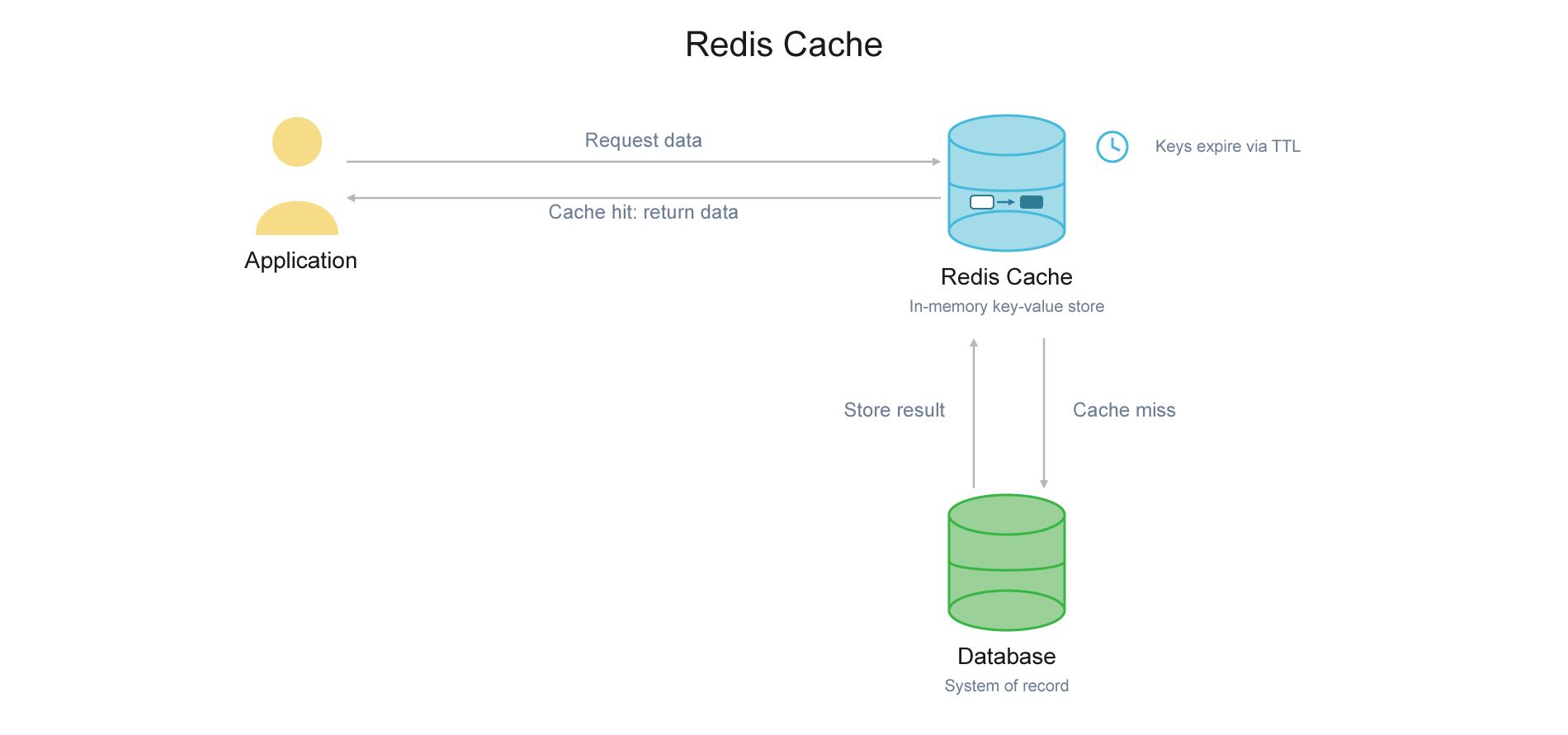
Redis cache works as a read-through or cache-aside layer between the application and the primary data store. The application queries Redis first; a hit returns the value from memory in sub-millisecond time, while a miss triggers a read from the primary database, a write-back into Redis, and a response to the caller. Because Redis operates on a single-threaded event loop per shard, each individual command executes atomically without lock contention, which keeps latency predictable under moderate load.
What are Redis cache limitations?
The core limitation is that Redis cache is bound by RAM: the primary deployment modes require the entire working dataset to fit in memory, and RAM costs roughly 50x more per gigabyte than SSD storage in most modern architectures. Redis’s single-threaded command processing also becomes a bottleneck under high-concurrency workloads — adding shards distributes keys across more single threads, but a cluster proxy layer introduces its own coordination overhead. See the limitations section below for a full breakdown.
How does Redis compare to other in-memory cache systems?
Compared to Memcached, Redis supports structured data types and optional persistence, at the cost of more operational surface area. Compared to disk-backed engines built for cache-like access patterns, Redis trades a hard RAM ceiling for lower absolute latency on datasets that comfortably fit in memory — the tradeoff that matters most once a dataset outgrows a single node’s affordable RAM footprint.
Is Redis cache open source?
Redis the database engine is currently available under three open-source licenses: RSALv2, SSPLv1 or AGPLv3. Self-managed Redis cache deployments leveraging the open source version are common. Redis Enterprise and Redis Cloud add managed operations, active-active geo-replication, and enterprise support on top of the open-source core, at additional cost.
How fast is Redis cache?
A cache hit typically resolves in well under a millisecond because the value is read directly from RAM with no disk I/O. Actual latency at the application layer depends on network round-trip time, command complexity, and — under load — whether the single-threaded shard handling the request is contended.
How long does Redis cache last?
A cached value lasts until its TTL expires, it’s explicitly deleted, or it’s evicted early under memory pressure. Once the dataset approaches the configured maxmemory limit, Redis applies whatever eviction policy is set (e.g., LRU, LFU, or TTL-based) to remove keys before that TTL naturally expires, which can shorten effective cache lifetime well below what applications assume.
How much data can be stored in Redis cache?
Capacity is capped by available RAM across the cluster, minus overhead for replication, persistence buffers, and Redis’s own data structure overhead. Once the dataset exceeds that ceiling, Redis starts evicting keys under its configured policy rather than storing everything. Automatic overflow to disk within a single Redis cache deployment is restricted to Redis Enterprise edition.