


DynamoDB Secondary Index FAQs
What is a DynamoDB Secondary Index?
A DynamoDB secondary index lets you query data using attributes other than the table’s primary key. While secondary indexes improve read capabilities, they come with trade-offs. They require additional storage and can slow down writes, since updates to the base table must also update the indexes. To use them effectively, it’s important to plan your data model around your application’s query patterns.
What is a Global Secondary Index in DynamoDB?
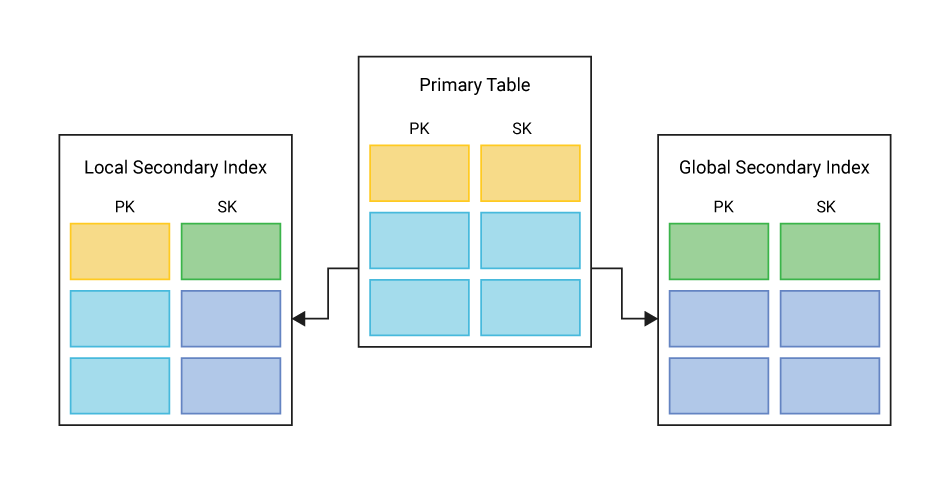
A DynamoDB Global Secondary Index (GSI) is a type of secondary index that allows you to query a table using a different partition key and optionally a sort key from those defined in the table’s primary key. GSIs give you powerful flexibility to support multiple access patterns without duplicating data across tables. All GSI reads are eventually consistent; strongly consistent reads are not supported.
Unlike LSIs, GSIs are not limited to sharing the same partition key as the base table. In provisioned mode, a GSI can have its own RCU/WCU; in on‑demand mode it shares capacity with the base table. GSIs are ideal for scenarios where you need to query your data in ways that aren’t possible with just the primary key.
What is a Local Secondary Index in DynamoDB?
A DynamoDB Local Secondary Index (LSI) is a type of secondary index that lets you query data using the same partition key as the base table but with a different sort key. This allows you to create alternate views of your data within the same partition and is useful when you want to sort or filter items in multiple ways. LSI reads and writes draw from the table’s provisioned (or on‑demand) capacity. Each base table write is charged once for the table plus once again for every LSI it updates.
Because LSIs require a composite primary key, they must be declared when the table is created; they cannot be added later. Like GSIs, LSIs can project specific attributes from the base table to improve query performance and reduce storage costs. Because LSIs share the partition key with the base table, all the data for a partition stays on the same node, which can result in more efficient queries, but also means there’s a 10 GB size limit per partition across all LSI and base table data.
How Does Secondary Index Work in DynamoDB?
In DynamoDB, a secondary index works by creating a separate, automatically managed data structure that allows you to query a table using alternative keys. This index maintains a copy of selected attributes from the base table, organized by a different key schema: Either a different partition key and sort key (in the case of a GSI) or the same partition key with a different sort key (in a LSI).
When you write, update, or delete data in the base table, DynamoDB updates any associated indexes behind the scenes to keep them in sync. Queries against a secondary index behave much like those against the base table: you can use key conditions, filter expressions, and projections to return only the data you need. GSI updates are propagated asynchronously, so the index can be briefly stale. LSI updates occur within the same partition and appear immediately in strongly‑consistent reads.
Because the index is structured differently, it allows you to access the same underlying data from different perspectives, without duplicating your entire dataset. However, maintaining these indexes requires additional storage and can slightly impact write performance, so they should be designed based on clear access patterns.
How to Create Secondary Index on DynamoDB
To create a secondary index in DynamoDB, you first need to decide whether you need GSI or a LSI. GSIs offer the most flexibility and can be added to an existing table at any time. Adding a GSI starts a background back‑fill that copies existing items into the index. The work consumes the index’s write capacity; if that isn’t large enough, writes to the index (and therefore the table) can be throttled until back‑fill finishes.”
You define a GSI by specifying a new partition key, and optionally a sort key, along with any attributes you want to project into the index. This can be done using the AWS Management Console, the AWS CLI, or via Infrastructure as Code tools like CloudFormation or Terraform. You can also control the read/write capacity mode and the set of attributes that the index should include.
In contrast, LSIs must be defined at the time the table is created because they cannot be added later. When defining an LSI, you use the same partition key as the base table but choose a different sort key to support an alternate sorting or filtering pattern within that partition. You also choose which attributes to project into the index, either selecting all attributes, only the keys, or a subset of specific attributes.
Whether you choose a GSI or LSI, planning your index schema based on real query requirements is key to getting good performance and avoiding unnecessary storage and write overhead.
How Many Secondary Indexes Are Allowed Per Table?
In DynamoDB, each table can have:
- Up to 5 LSIs — but these must be defined at the time of table creation and cannot be added later.
- Up to 20 GSIs — and these can be added or deleted at any time after the table is created.
These limits are per table and are set by default. If you need more than 20 GSIs, you can request a service limit increase through AWS Support. Keep in mind that each index adds storage and write overhead, so it’s best to only create indexes that directly support your application’s query patterns.
Advantages of DynamoDB Secondary Indexes
- Flexible Querying: Secondary indexes let you query your data using attributes other than the primary key, enabling multiple access patterns without duplicating your data in multiple tables.
- Efficient Lookups: Queries on secondary indexes are much faster and more efficient than scanning the entire table, especially when the index is designed around common access patterns.
- Attribute Projection: You can choose which attributes to include in the index, reducing the amount of data stored and returned in queries — helpful for performance and cost optimization.
- Real-Time Updates: Secondary indexes are automatically kept in sync with changes to the base table, ensuring your queries return up-to-date results without manual intervention.
Disadvantages of DynamoDB Secondary Indexes
- Increased Write Latency and Cost: Every write, update, or delete operation must also update the relevant secondary indexes. This adds overhead, which can impact performance and raise your DynamoDB costs.
- Storage Overhead: Indexes require additional storage, especially if many attributes are projected into them. This can increase your total storage usage significantly.
- Limited Index Count: There’s a cap of 5 LSIs and 20 GSIs per table. While often sufficient, complex applications with many query patterns might find this limiting.
- LSI Limitations: LSIs must be defined at table creation and share the same partition key as the base table, which can constrain flexibility and future design changes.
- Read Lag: Since GSIs support only eventual consistency, reads may lag behind writes.
- Scale: If the combined size of a partition’s items and their LSI entries exceeds 10 GB, further writes to that partition will fail.
Does ScyllaDB Offer an Alternative to DynamoDB Secondary Index?
Yes, ScyllaDB offers both global and local secondary indexes as alternatives to DynamoDB’s indexing approach.
Global secondary indexes in ScyllaDB are implemented using materialized views, allowing efficient querying across all nodes by restructuring data around the indexed column. Local secondary indexes are optimized for cases where the indexed column shares the same partition key as the base table, keeping both data and index on the same node for faster access.
This approach offers flexible and performant indexing options suited to different application needs. Indexes are materialized‑view tables, so writes incur the same amplification and extra storage that views do; there’s no 10 GB cap (as there is with DynamoDB).