Let’s use a new API and UI to investigate ScyllaDB Cloud usage and discover some cost reductions
 We recently added a new metering API to ScyllaDB Cloud to help you understand exactly what you’re spending your money on.
In this post, we share how the metering API can help you identify costs across multiple axes – and reduce them in ways that compound. We use two recent use cases to show how the API and an AI detective can reduce a ScyllaDB customer’s costs.
Introducing the Metering API
The Metering API returns your account’s compute, network and backup usage, from the cluster to node level, for any time slice.
Here’s a sample API request:
| Parameter | Required | What it does |
|---|---|---|
| from, to | Yes | RFC 3339 timestamps; neither may be in the future |
| granularity | No | GRANULARITY_HOUR or GRANULARITY_DAILY (default) |
| clusterId | No | Narrow to one cluster |
| dcId | No | Narrow to one datacenter |
| networkGroupId | No | Narrow to one network group |
And here’s (part of) a sample response:
Reference: Scylla Cloud API Reference
Some details to keep in mind as you use the API:
- Hourly data covers roughly the last month, up to 744 buckets per request. Daily data covers up to a year, 366 buckets per request. For this investigation, we recommend daily granularity
- Network and backup data are shown as fresh as possible from the cloud providers. Network and backup data arrives as soon as the cloud providers publish it. Data from the last 4 days might be incomplete.
- One network group can include more than one cluster. Filter by networkGroupId rather than summing across clusters.
- While compute resources are metered in seconds, billing is done in hours.
ScyllaDB Cloud Usage Console
The same metering data is available in the ScyllaDB Cloud console, in a more human friendly UI.
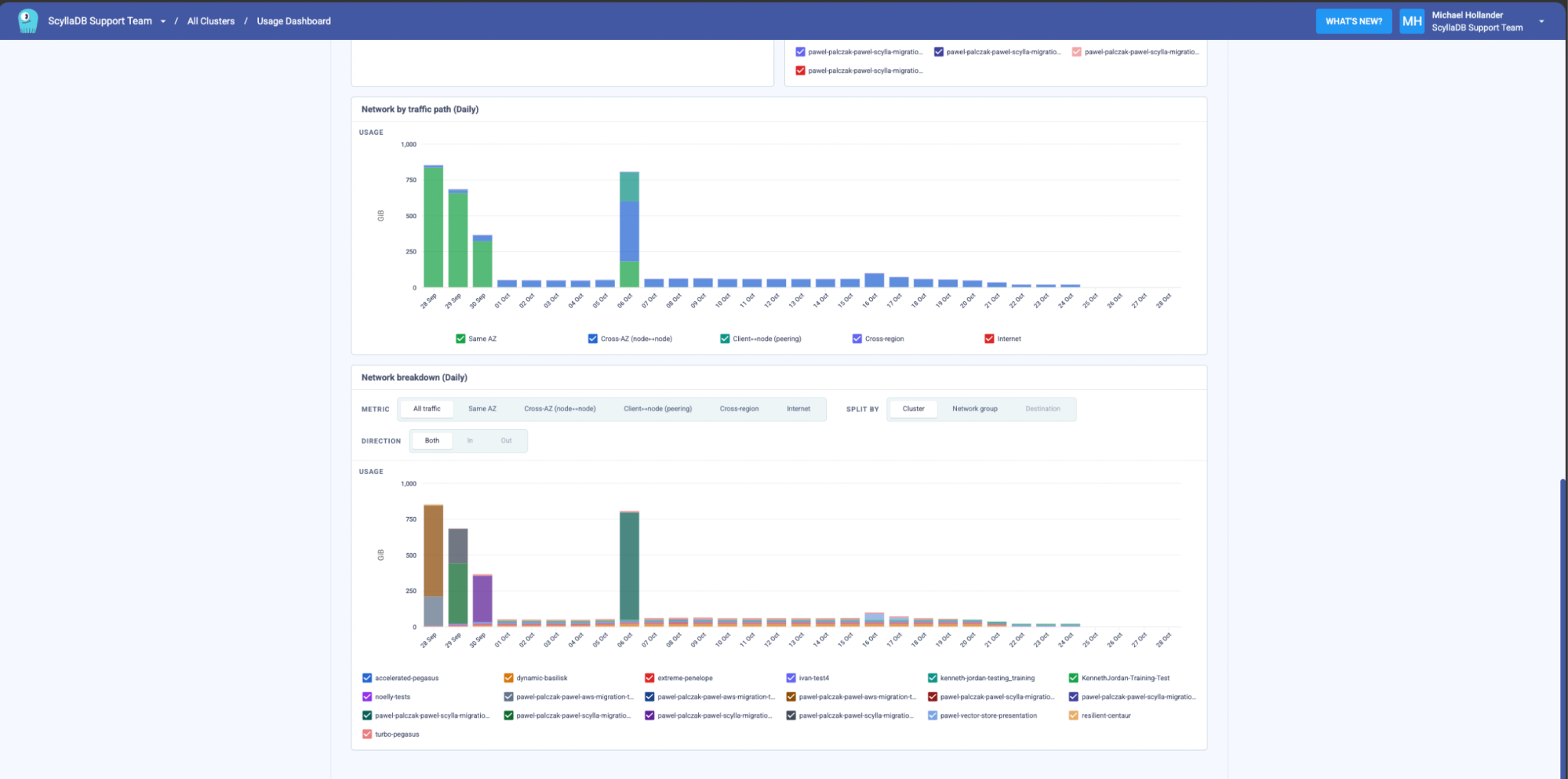
Pick a date range and granularity, then narrow by cluster, datacenter or network group. You can also drill down to see one cluster, one node, and one network group.
Finding and fixing potential cost issues
A study in Scarlet: Minimize network costs with rack-aware drivers
For this case, we will use AI as our Sherlock Holmes, allowing it to run a short investigation.
The Story: a ScyllaDB Cloud customer was running 100,000 operations per second of 1KB payloads on a cluster across three AWS availability zones. Application servers lived in the same zones, but the network usage was very high.
As Sherlock Holmes says: “It is a capital mistake to theorize before one has data.”
In our case, the data was extracted using the metering API. We used it to export a CSV of hourly network usage for the cluster’s network group, which showed about 360 GB of traffic per hour.
What (Sherlock) AI found.
We gave LLM the CSV, with a short prompt:
“You are a cost detective. Attach network and compute usage for the ScyllaDB Cloud cluster. The app runs in the same three AZs as the cluster, 100k ops/s of 1 KB each. Does it make sense? How is the cost criminal?”
“100k ops/s at 1 KB is about 360 GB an hour, so nearly every request was crossing a zone boundary…with AWS charging $0.01 per GB in each direction for cross-zone traffic. The prime suspect is the driver! It might send requests to coordinators in any zone, not only the close one.”
Driver full rehabilitation
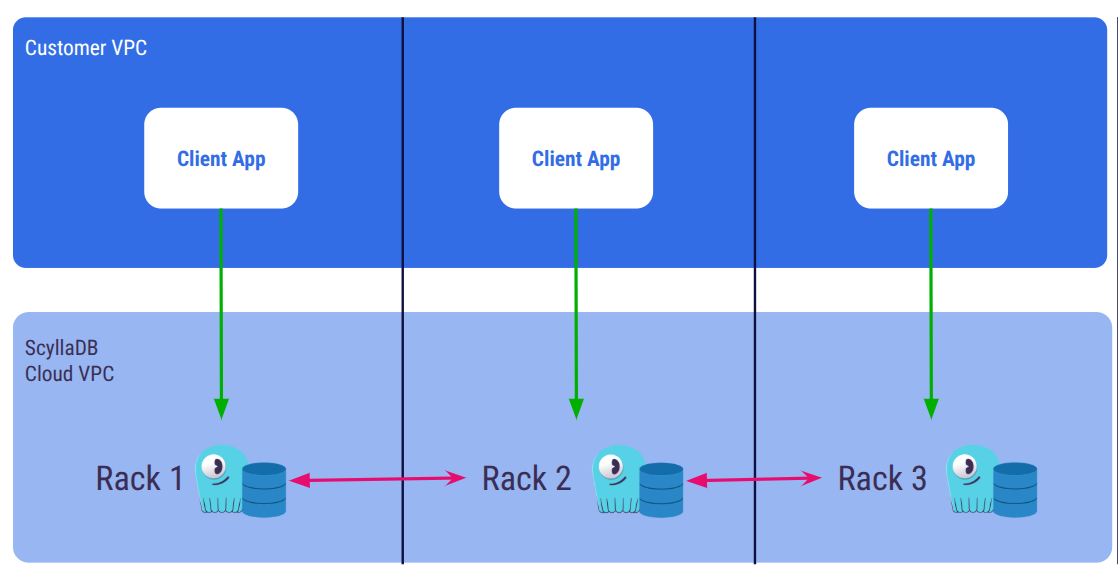
After some correctional counseling, the driver fix is straightforward: update the policy to “local first.” In this case, Python drivers were used. This is how to set a token-aware, rack-aware load-balancing, local-first policy for Python:
Here’s a look at the network traffic before the fix:

And here’s the network traffic after the fix:
Here are the savings – before and after, per year:
| Traffic | Zone-unaware driver | Rack-aware driver |
|---|---|---|
| Quorum reads | $126k | Close to $0 (same zone, token aware; replicas exchange checksums only) |
| Quorum writes | $189k | $63k (replication to 2 other zones, with 50% compression) |
| Total | $315k | $63k |
| Workload | Routing | Share of traffic | Client to coordinator (GB/h) | Coordinator to replicas (GB/h) | Cost per month ($) | Cost per year ($) |
|---|---|---|---|---|---|---|
| Quorum writes | Not zone-aware | 50% | 120 | 360 | $7,008 | $84,096 |
| Quorum reads | Not zone-aware | 50% | 120 | – | $1,752 | $21,024 |
| Total, 50/50 mix | Not zone-aware | 100% | 240 | 360 | $8,760 | $105,120 |
| Quorum writes | Zone-aware | 50% | – | 360 | $5,256 | $63,072 |
| Quorum reads | Zone-aware | 50% | – | – | – | – |
| Total, 50/50 mix | Zone-aware | 100% | – | 360 | $5,256 | $63,072 |
| Summary: savings from zone-aware routing | Zone-aware vs. not | (240) | – | ($3,504) | ($42,048) |
That is $42k a year saved (40%) in network cost, from a driver configuration change.
Significant savings, even for Sherlock!
A scandal in Bohemia: two teams (unintentionally) hide information from each other
[names, characters, occupations, places, and identifying details have been changed to protect the privacy and identity of the individuals involved.]
In many cases, multiple teams in the same organization all use ScyllaDB…but they’re not always communicating and tend to get out of sync.
In this case, team Adler is responsible for the backups.
Team Sherlock is responsible for infra costs.
By default, ScyllaDB Cloud takes a daily backup, keeps it for 14 days, and stores it in S3 Standard.
Team Adler updated the policy to keep 52 weeks of backup for regulatory compliance (and as protection against the King of Bohemia)
Team Sherlock, unaware of Team Adler’s actions, notices the cluster cost growing every week for months.
As before, Sherlock starts with collecting evidence:
He pulls backup usage from the start of backup data, filtered to the Backup rows. Looks like the backup cost continues to grow. Clearly someone is keeping the data longer than expected.
Fortunately, they can significantly reduce the backup costs by moving backup to a less expensive tier:
| S3 class | Storage cost per month ($) | Storage cost per year ($) | Storage savings vs. S3 Standard (%) | One-time cost to retrieve all data ($) |
|---|---|---|---|---|
| S3 Standard | $2,300 | $27,600 | – | – |
| Glacier Instant Retrieval | $400 | $4,800 | 82.6% | $3,000 |
| Glacier Deep Archive | $99 | $1,188 | 95.7% | $2,000 |
| Glacier Deep Archive (bulk) | $99 | $1,188 | 95.7% | $250 |
(AWS us-east-1 prices)
So they just used S3 lifecycle rules to move the backup data to the colder class one day later:
This yielded some nice savings. For every 100 TB of retained backups:
| Storage class | Cost per year | Saved vs S3 Standard |
|---|---|---|
| S3 Standard | $28,260 | |
| Glacier Instant Retrieval | $4,920 | $23,340 (83%) |
| Glacier Deep Archive | $1,212 | $27,048 (96%) |
The main trade-off here is restore time. With Deep Archive, the total restore time is the S3 retrieval (up to 12 hours) plus the normal ScyllaDB restore. For compliance backups that are almost never read, that is usually an easy call.
In this case, Team Sherlock manages to have their cake and eat it too – backup retention is longer, but at a lower price. And that leaves more money for the old Sherlock cocaine habit!