


A technical FAQ on ScyllaDB X Cloud: architecture, autoscaling, compression, use cases, and more
It’s been a few months since ScyllaDB X Cloud landed. In case you missed the news, here’s a quick recap…
ScyllaDB X Cloud is the next generation of ScyllaDB’s fully-managed database-as-a-service. It’s a truly elastic database designed to support variable/unpredictable workloads with consistent low latency as well as low costs.
Users can scale out and scale in almost instantly to match actual usage. For example, you can scale all the way from 100K OPS to 2M OPS in just minutes, with consistent single-digit millisecond P99 latency. This means you don’t need to overprovision for the worst-case scenario or suffer the lag traditionally associated with ramping up capacity in response to a sudden surge.
Some key features (all covered in Introducing ScyllaDB X Cloud: A (Mostly) Technical Overview):
- Tablets + just-in-time autoscaling
- Up to 90% storage utilization
- Support for mixed size clusters
- File-based streaming
- Dictionary-based compression
- Flex credit
Here’s a look at ScyllaDB X Cloud in action:
Not surprisingly, users have been quite curious about all these changes and new options. So we thought we’d collect some of the most common questions here, along with our answers. In no particular order…
What are the key differences between a “standard” ScyllaDB Cloud database and “ScyllaDB X Cloud”?
Compared to a standard ScyllaDB Cloud database, ScyllaDB X Cloud provides two major advantages:
- Faster scaling in and out.
- Higher storage utilization (90% vs. 70%).
The above advantages are the result of two technical updates:
- X Cloud always uses Tablets, while standard databases can use a mix of vNode and Tablets keyspaces.
- X Cloud enables mixed sized clusters, so you can define more granular cluster and storage sizes.
In which cases should you choose a “standard” ScyllaDB Cloud Database vs X Cloud?
None! We’ve reached full parity now. Materialized views, CDC, Alternator (DynamoDB API), even counters – it’s all supported.
Can I migrate from one type of ScyllaDB Cloud database to the other?
Yes. If you are using a standard database with Tablets only, you can migrate this database to X Cloud. If you are using vNode keyspaces, you cannot (yet).
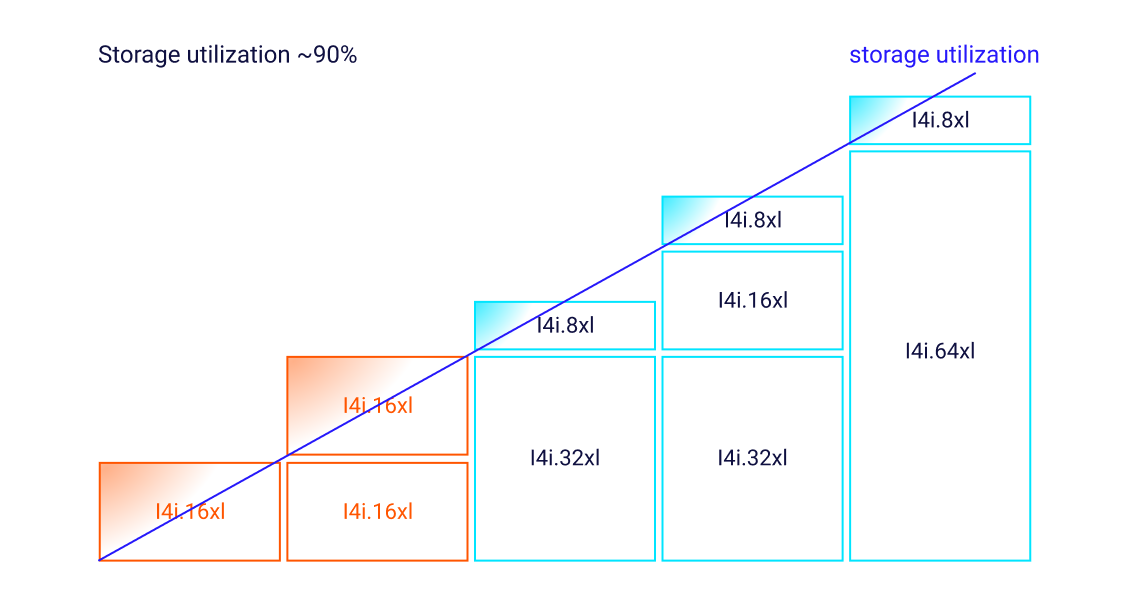
How does X Cloud achieve higher storage utilization?
Two factors enable higher storage utilization:
- Faster scaling removes the need to over-reserve storage space (or “sandbag”) while waiting for the cluster to expand
- Support for mixed instance sizes allows for more granular cluster size
How can I start an X Cloud cluster?
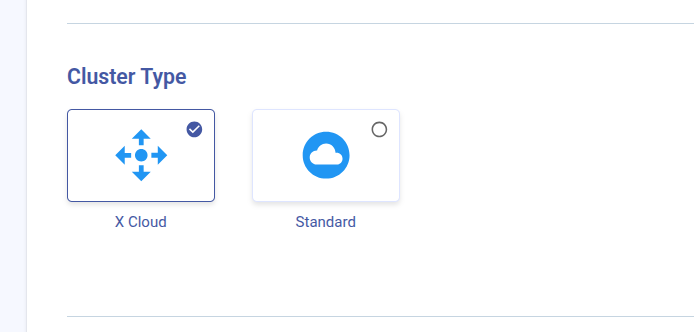
Simply choose the “X Cloud” Cluster Type on ScyllaDB Cloud’s Launch Cluster page.
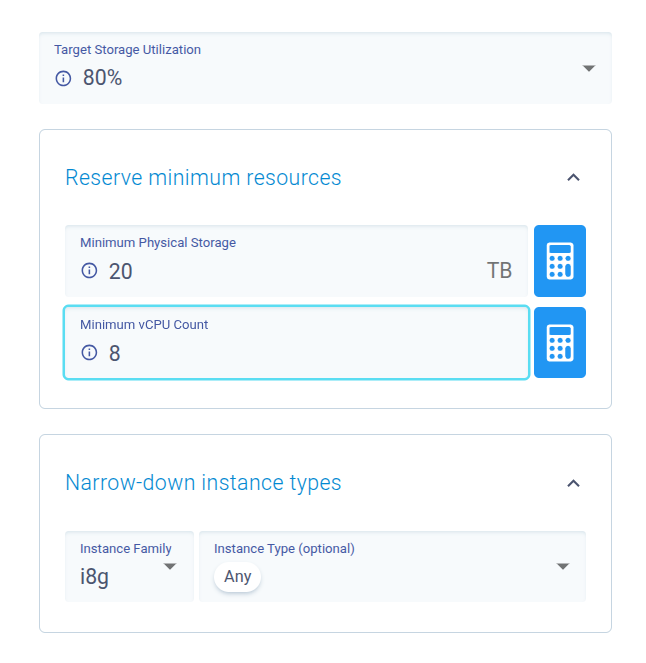
How can I set the scaling policy? Can I change it later, while the database is in production? (UI/API)
The scaling policy is part of the X Cloud cluster properties. You can either set it when launching the cluster or update it later.
The policy is optional. It defines the minimum required resources for your database in terms of vCPU and Storage. If you’re not sure how to set it, you can keep the default minimum values (zero) as is.
The cluster will scale automatically if and when storage is approaching the threshold, and you can scale the vCPU as required by your workload. Note that the parameters affect each other since more storage may require more compute power.
How are X Cloud and Tablets related?
X Cloud takes advantage of (and depends on) Tablets to achieve faster scale and higher storage utilization. That means all Keyspaces in X Cloud must use Tablets, which is already the default for ScyllaDB Cloud.
How can X Cloud help reduce database costs?
There are a few ways that X Cloud reduces cost.
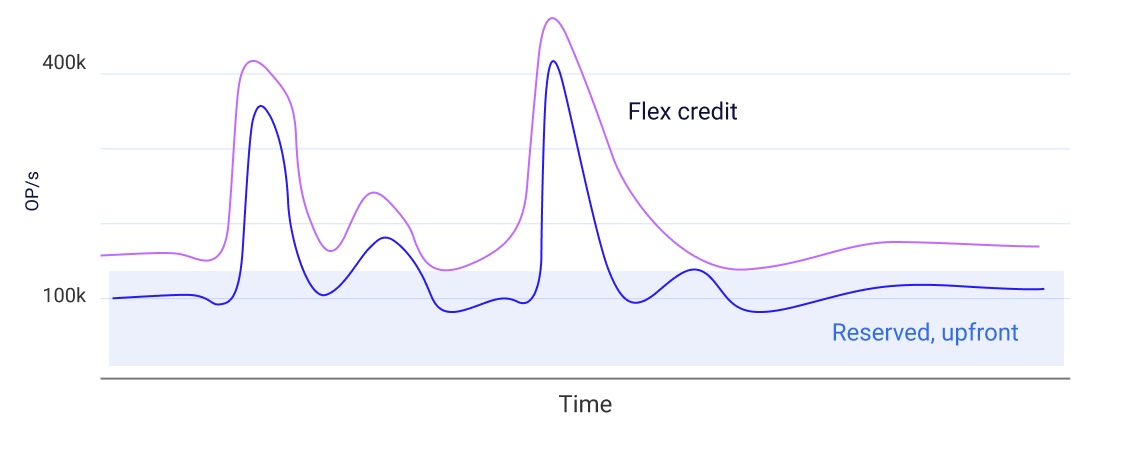
- The primary factor is the extreme elasticity. You can scale the cluster in and out, even multiple times per day, to meet the demand. If you cannot reliably plan the cluster usage, you can reserve a minimal deployment and pay for bursts using Flex Credit.
- The higher storage utilization means you use less cloud resources.
- Improved compression, both on the wire and at rest, reduces cost further.
What’s a good use case for ScyllaDB X Cloud? Am I a good candidate for ScyllaDB X Cloud?
New (greenfield) workloads should use X Cloud. Workloads that require frequent scaling out/in will benefit the most. For example:
- A workload with significant fluctuation throughout the day (e.g., peak hours during the evening).
- A workload with expected high demand on specific days of the year (e.g., Super Bowl, IPL games, or Black Friday). With X Cloud, scaling can be done days in advance. You don’t need to do it one or more weeks ahead.
- Difficult-to-predict workloads, with common (but volatile) bursts.
How many times per day can X Cloud scale?
As often as required. Although new nodes start serving requests very fast, it still takes time for the data balancing to be complete if you’re working with rather large nodes.
Does X Cloud support multi-DC (region) deployment? Does each region scale independently?
X Cloud does not yet support multi-datacenter deployment. Multi-DC support is coming with the 2026.2 release.
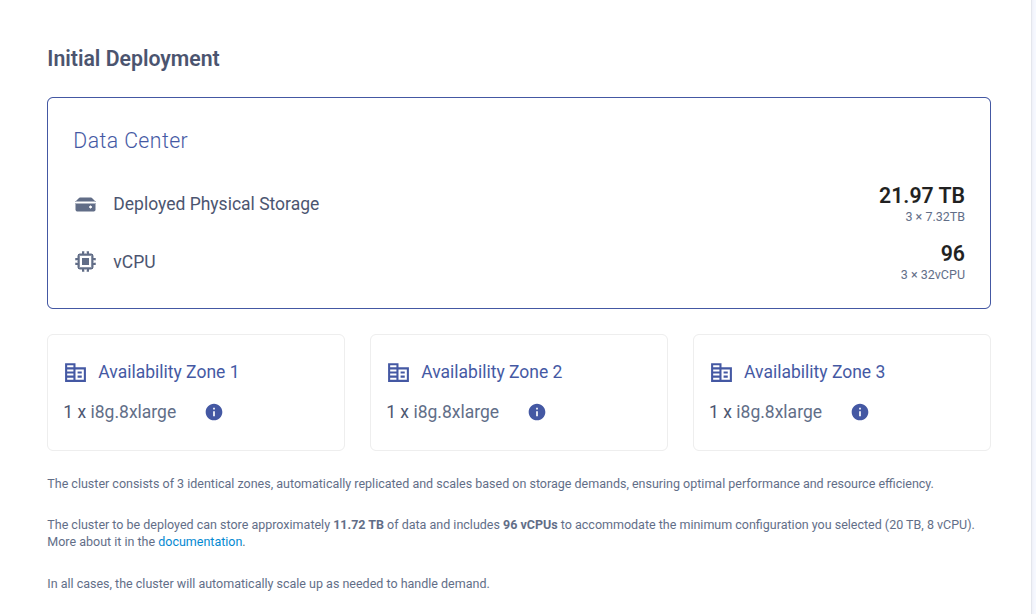
Scaling Policy: I asked for storage of Y TB and got a bigger cluster with storage of W TB…why? Same for vCPU?
vCPU, RAM, and Storage are not independent variables. ScyllaDB will allocate each of these 3 variables to support the required value of the other two. For example, higher storage requires more RAM – which requires more vCPU. The policy UI reflects the expected deployment per each resource selection.
Can I suspend / resume the dynamic scaling?
Currently: no.
Can I restore a backup from X Cloud database to a standard database and vice versa?
Yes, you can.
Is X Cloud production ready?
Absolutely, customers are already using it in production.
Why should I care about advanced compression? What is the advantage of having it?
ScyllaDB already supported compression before X Cloud – including at-rest and in-transit. However, dictionary-based compression is much more effective in reducing data overhead. By compressing data further, you save on disk space utilization (combined with up to 90% disk space utilization) as well as inter-AZ networking for data replication and high availability.
X Cloud claims faster scaling. How fast is it really?
The legacy vNode-based architecture imposed some limitations:
- Nodes could only be added one at a time, even across DCs.
- Data was replicated in rows – that is, rows were being transferred over the wire.
- A node only started serving requests after its streaming was fully completed.
This process could easily take hours, if not days, to complete on large clusters.
Now, X Cloud leverages tablets to remove those limits:
- Nodes can be added in parallel, multiple nodes at a time, including across DCs.
- Nodes join the cluster instantly, then start streaming data later.
- Streaming under Tablets relies on file-based streaming, transferring gigabytes of data per second in a very efficient process.
- As Tablet transfers complete, nodes start to serve requests immediately; this increases as more transfers complete, until the cluster rebalancing is completed.
This allows X Cloud to scale to an unlimited number of nodes at a single step – and streaming data is made super efficient by file-based streaming. A cluster can go from 100K ops per second to 2M ops per second in a matter of a few minutes, not hours or days.
Can I use Vector Search with X Cloud?
Yes, you can! Enable the Vector Search option at the bottom of the Launch Cluster page and choose the Vector Search instances. Note that Vector Search index nodes scale independently from ScyllaDB nodes. You can learn more about Vector Search here.