





This blog post (tries to) consolidate what we’ve learned from years of tuning Apache Cassandra for performance
Here at ScyllaDB, we often run internal and external performance comparisons. Internal testing helps ensure ScyllaDB’s performance advantage, track performance regressions, and maintain compatibility, including catching subtle API semantic-layer changes early. External comparisons are our way to aggregate the performance results for the general public every once in a while.
Performance tuning can be a double-edged sword. Overlook one aspect, and you may end up under- or overestimating one’s performance numbers – and that may introduce deep ramifications down the road. While ScyllaDB and Cassandra both share a common API layer and feature set, both systems have fundamentally different architectures. This naturally adds to differences in how each system is tested and tuned.
This blog post (tries to) consolidate what we’ve learned from years of tuning Apache Cassandra for performance. We spent a good amount of time hunting down the information we needed. Hopefully, the details described here help others improve their existing Cassandra cluster performance, as well as conduct more meaningful performance comparisons.
Side-note: ScyllaDB shares how to reproduce our tests, including references on which settings and parameters we tuned. Check out our Cassandra 4 vs Cassandra 3.11 comparison, my recent talk on how ScyllaDB compares to Cassandra 5, and the comparison between Cassandra vNodes and ScyllaDB tablets as some concrete examples.
Overview
Perhaps the most relevant Apache Cassandra tuning source publicly available is Amy’s Cassandra 2.1 tuning guide. Despite its 2.1 reference (released in 2014), we find that most of the guidance (or, at least, the high-level concepts) provided there survived the ashes of time, including the array of settings that administrators need to configure by hand.
Despite the over-a-decade-long difference, one of Amy’s particular thoughts stands out, and should guide you whenever you’re working with Apache Cassandra tuning:
“The inaccuracy of some comments in Cassandra configs is an old tradition, dating back to 2010 or 2011. (…) What you need to know is that a lot of the advice in the config commentary is misleading. Whenever it says “number of cores” or “number of disks” is a good time to be suspicious. (…)” – Excerpt from Amy’s Cassandra 2.1 tuning guide, cassandra.yaml section
Apache Cassandra was originally conceived to run on commodity hardware. It is shipped under the assumption that the end user will configure and tune it for their specific environment. And it also assumes users know what they’re doing.
What’s counterintuitive about Apache Cassandra tuning is how small settings can have an outsized impact on performance. Figure 1 perfectly demonstrates this aspect. It shows how both throughput and latencies vary significantly under different GC, compaction, and disk read-ahead settings.
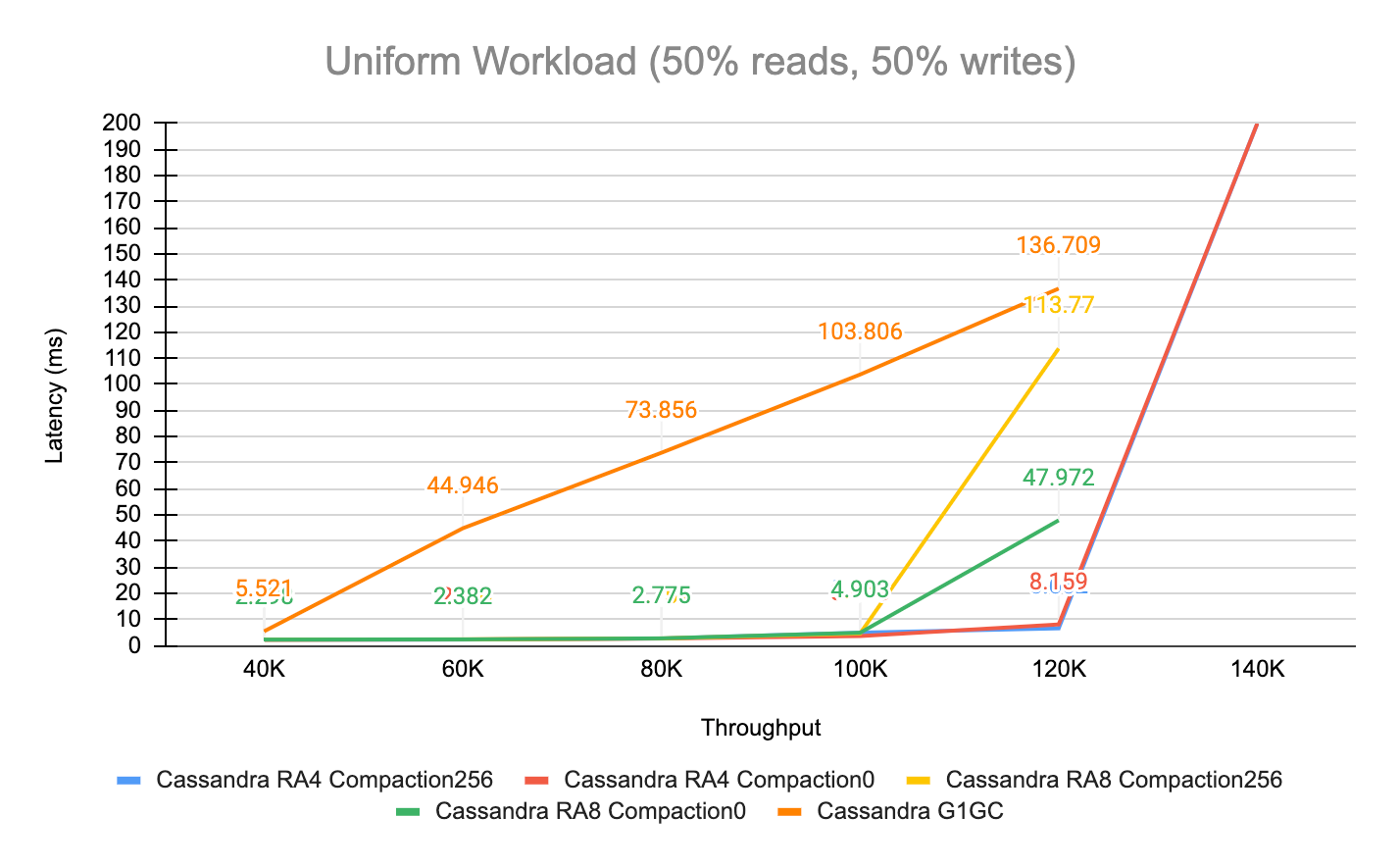
Figure 1 – Apache Cassandra 5 performance under different settings
One last note before we dive right into tuning specifics: our goal is not to replace Amy’s well-covered, exhaustive guide. Instead, take our words as a complementary reference. We also don’t claim to be experts in the art of Cassandra performance tuning or troubleshooting; rather, we’re practitioners who learned some things (the hard way).
Cassandra-Specific Tuning
At a minimum, focus your efforts on the following files:
cassandra.yamljvm[NN]-server.optionsjvm-server.options
cassandra.yaml
To help users get started, a stock Apache Cassandra installation ships with two config files. The first file – cassandra.yaml – is oriented for users upgrading from a previous Cassandra release and comes with backward-compatible settings. The second – cassandra_latest.yaml – “contains configuration defaults that enable the latest features of Cassandra, including improved functionality as well as higher performance. This version is provided for new users of Cassandra who want to get the most out of their cluster, and for users evaluating the technology.” Source: the Cassandra project.
If you spin a fresh cassandra:5 container or simply initiate your tuning journey without taking this into consideration, you’ll end up running your deployment under compatibility mode. The following command demonstrates how a freshly spun Cassandra 5 container starts under compatibility mode, rather than enabling its latest features:
root@container:/etc/cassandra# diff cassandra.yaml cassandra_latest.yaml | sed 's/^>/[cassandra_latest.yaml]/g;s/^</[cassandra.yaml]/g' | egrep 'compatibility|memtable' | sort
[cassandra.yaml] memtable_allocation_type: heap_buffers
[cassandra.yaml] storage_compatibility_mode: CASSANDRA_4
[cassandra_latest.yaml] memtable_allocation_type: offheap_objects
[cassandra_latest.yaml] storage_compatibility_mode: NONE
It’s beyond the scope of this write-up to provide an exhaustive list of settings you should pay attention to when setting up Cassandra. The stock cassandra.yaml is often irrelevant, and we ended up simply replacing it with the cassandra\_latest.yaml instead. If you are starting a fresh new cluster, we highly recommend you do the same.
However, you probably want need to be extra cautious if you are an existing Cassandra user. Oftentimes the semantics of a particular setting may change entirely, making it particularly hard to track down. In one of our streaming performance tests, we noticed Cassandra’s streaming operations had a default cap of 24MiB/s per node, resulting in suboptimal transfer times. Upon raising those thresholds, we observed:
- Cassandra 4.0 docs mentioned tuning the
stream_throughput_outbound_megabits_per_secoption - Both Cassandra 4.1 and Cassandra 5.0 docs referenced the
stream_throughput_outboundoption - Only reading this Instaclustr article (or carefully interpreting cassandra\_latest.yaml) eventually shed some light on the correct option:
entire_sstable_stream_throughput_outbound.
In other words, 3 distinct settings exist for tuning the previous 3 major releases of Apache Cassandra – and one of them was incorrectly documented under the official project’s page. This raises concerns about the feasibility of upgrading from older releases. Given these constraints, we highly encourage organizations to conduct a careful review and full round of testing on their own. This is not an edge case; others noted similar upgrade problems on the Apache Cassandra Mailing List.
With that in mind, here are some examples of misleading Cassandra config comments and why upgrades deserve some extra diligence:
- CASSANDRA-16315 – Covers the
concurrent_compactorssetting - CASSANDRA-7139 – Describes how that same
concurrent_compactorssetting default was production unsafe when introduced - CASSANDRA-20692 – Describes how a commitlog correctness issue slipped through to Cassandra 5
JVM settings
| Test Kind | Garbage Collector | Read-ahead | Compaction Throughput | P99 Latency | Throughput |
|---|---|---|---|---|---|
| Cassandra RA4 Compaction256 | ZGC | 4KB | 256MB/s | 6.662ms | 120K/s |
| Cassandra RA4 Compaction0 | ZGC | 4KB | Unthrottled | 8.159ms | 120K/s |
| Cassandra RA8 Compaction256 | ZGC | 8KB | 256MB/s | 4.657ms | 100K/s |
| Cassandra RA8 Compaction0 | ZGC | 8KB | Unthrottled | 4.903ms | 100K/s |
| Cassandra G1GC | G1GC | 4KB | 256MB/s | 5.521ms | 40K/s |
Tuning the JVM is the least fun part of operating a Cassandra cluster. It can be a journey on its own, really. The good news is that Cassandra 5 includes support for JDK17, and users may now opt-in for using ZGC rather than the decades-long G1 garbage collector.
Unless you are a Java expert and know exactly what you are doing, this theLastPickle article is perhaps your best resource for tuning Cassandra’s JVM. You could read that and call it a day. Still, here are some details on what we’ve discovered along the way, since the DataStax (now IBM) Tuning Java resources page only advises under a remark of adjusting “settings gradually and test each incremental change”:
- We’ve consistently measured lower latencies and higher throughput using
ZGCunder a handful of different scenarios. Although we’ve seen some users reporting goodG1performance results, this doesn’t align with what we’ve experimented with in practice. - Remember that Cassandra relies on both off-heap as well as on-heap memory. The heap size will depend on how much RAM your setup has. Since we primarily test on 128GB RAM machines, we found that allocating beyond 32G would be wasteful.
- theLastPickle‘s article mentioned earlier makes a good point about compressed OOPs, though we believe this should be relevant for RAM constrained systems. We didn’t observe any noticeable benefits/disadvantages from having
31G/32Gin our results. - Most of the JVM settings will sit under the
jvm17-server.optionsfile (if you’re using JDK17). However, there is yet another file (jvm-server.options, note there’s no Java version) that you should also edit. Apparently Cassandra has some built-in scriptology incassandra.in.shthat looks up the latter and inherits options from it. Then, if your heap settings (-Xmx&-Xms) are unset, it will automatically define it for you:
#################
# HEAP SETTINGS #
#################

# Heap size is automatically calculated by cassandra-env based on this
# formula: max(min(1/2 ram, 1024MB), min(1/4 ram, 8GB))
# That is:
# - calculate 1/2 ram and cap to 1024MB
# - calculate 1/4 ram and cap to 8192MB
# - pick the max
#
# For production use you may wish to adjust this for your environment.
# If that's the case, uncomment the -Xmx and Xms options below to override the
# automatic calculation of JVM heap memory.
#
# It is recommended to set min (-Xms) and max (-Xmx) heap sizes to
# the same value to avoid stop-the-world GC pauses during resize, and
# so that we can lock the heap in memory on startup to prevent any
# of it from being swapped out.
#-Xms4G
#-Xmx4G
Therefore, uncomment and override the two lines above for your environment.
- After you are done, you may want to circle back to the
cassandra.yamlfile because there are some settings that influence your heap allocation. For example:networking_cache_sizefile_cache_sizememtable_offheap_spacerepair_session_space- among others…
If you feel like Cassandra is choking and the system is not under heap pressure, then playing with these settings is probably your next step. Sadly, this is where things become trial-and-error, and even more time consuming. (Though, in Cassandra’s defense, tuning most of these parameters is workload specific).
About Cassandra Caching
Apache Cassandra ships two caching-related settings:
row_cache_sizeandkey_cache_size
You should almost never enable either of these settings (0GiB means these are disabled). The only exception is when your workload has a (VERY) high cache hit ratio and is relatively static. The table below shows how both Row & Key caches have a negative performance impact in Cassandra during a scale-out:
| Kind | Step | Throughput | Retries |
|---|---|---|---|
| Cassandra 5.0 – Page Cache | 3 > 6 nodes | 56K ops/sec | 2010 |
| Cassandra 5.0 – Page Cache | 6 > 9 nodes | 112K ops/sec | 0 |
| Cassandra 5.0 – Row & Key Cache | 3 > 6 nodes | 56K ops/sec | 5004 |
| Cassandra 5.0 – Row & Key Cache | 6 > 9 nodes | 112K ops/sec | 8779 |
Likewise, Figure 2 shows how throughput varies significantly under a fully cached workload:
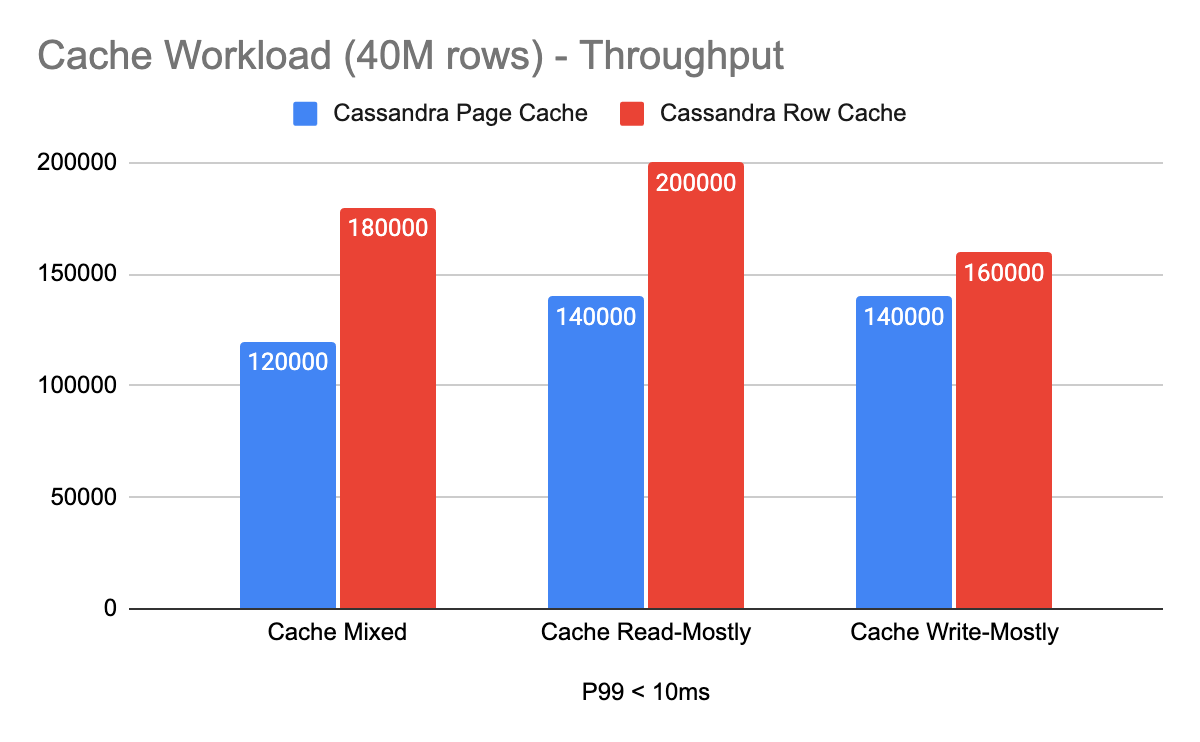
Figure 2 – Cassandra Row Cache vs OS Page Cache performance (speedup falls between 1.14x to 1.5x)
An old DataStax (IBM) documentation page strongly discourages its use, noting that users should prefer using the OS page cache instead:
Note: Utilizing the appropriate OS page cache will result in better performance than using row caching.
Counterintuitively, DataStax (IBM) later recommends enabling the Row Cache when the number of reads dominate compared to writes:
Tip: Enable a row cache only when the number of reads is much bigger (rule of thumb is 95%) than the number of writes. Consider using the operating system page cache instead of the row cache, because writes to a partition invalidate the whole partition in the cache.
OS Tuning
Operating system tuning for Cassandra shares many similarities with other databases. Preventing swapping, tuning the kernel via sysctl, setting disk read_ahead_kb settings, configuring user limits and enabling Transparent HugePages are the primary settings we touch when deploying Cassandra. This is (undoubtedly) a non-exhaustive list, although it should cover the strategies seen across most production Cassandra deployments in practice.
Depending on your setup, you may want to further check:
- your clocksource – particularly under Xen hypervisors;
- whether
cpupowersupports setting the CPU scaling governor to “performance” mode; - experimenting with jemalloc;
- configuring SMP IRQ Affinity;
- and pinning Cassandra to specific CPUs via taskset(1).
Disks
We primarily store Cassandra related files (including its related logs) on locally-attached NVMe disks, as commonly found within cloud hyperscalers. If there’s more than one attached disk to the VM, we combine them into a RAID-0 array using mdadm. In addition, we use XFS as the backing filesystem, particularly as it’s the same we use for ScyllaDB.
We also set only one-hit merges, limit read_ahead_kb to just 4kB, and disable the IO scheduler (if any):
MD_NAME=nvme1n1

sudo sh -c "echo 1 > /sys/block/$MD_NAME/queue/nomerges"
sudo sh -c "echo 4 > /sys/block/$MD_NAME/queue/read_ahead_kb"
sudo sh -c "echo none > /sys/block/$MD_NAME/queue/scheduler"
Some important remarks:
- the
schedulercommand may “fail” in modern Cloud instances (and that’s fine); - when using
mdadm, tune each block device individually backing the RAID device; read_ahead_kbis a workload dependent setting. We often test small partition lookups, but workloads with larger wide-rows may benefit from increasing that setting.
Memory
We don’t configure swapping at all to keep matters simple. The rationale is that Cassandra already benefits from the OS page cache, and we leave over half of the server’s RAM just for it.
During our tests, we also observed that enabling Transparent Huge pages, especially with ZGC, contributed positively to Cassandra’s performance. Although the improvement wasn’t remarkable, we observed positive results similar to what both Amy and Netflix reported.
The provided links already go in-depth on how to enable THP, as well as how to configure Cassandra to benefit from it. Keep in mind, however, that we recommend you set the -XX:+AlwaysPreTouch JVM option regardless of whether THP is enabled or not. That’s because it’s known to improve overall JVM runtime performance at the expense of increased JVM startup times.
Kernel and User limits
Put simply, you don’t want Cassandra to be limited on either networking, memory allocation, or the number of files it can open. We set sysctl.conf.d/99-cassandra.conf to the following values:
net.ipv4.tcp_keepalive_time=60
net.ipv4.tcp_keepalive_probes=3
net.ipv4.tcp_keepalive_intvl=10
net.core.rmem_default=16777216
net.core.wmem_default=16777216
net.core.optmem_max=40960
vm.max_map_count = 1048575
net.ipv4.tcp_rmem = 4096 87380 16777216
net.ipv4.tcp_wmem = 4096 65536 16777216
net.core.rmem_max = 16777216
net.core.wmem_max = 16777216
net.core.netdev_max_backlog = 2500
net.core.somaxconn = 65000
net.ipv4.tcp_ecn = 0
net.ipv4.tcp_window_scaling = 1
net.ipv4.ip_local_port_range = 10000 65535
net.ipv4.tcp_syncookies = 0
net.ipv4.tcp_timestamps = 0
net.ipv4.tcp_sack = 0
net.ipv4.tcp_fack = 1
net.ipv4.tcp_dsack = 1
net.ipv4.tcp_orphan_retries = 1
vm.dirty_background_bytes = 10485760
vm.dirty_bytes = 1073741824
vm.zone_reclaim_mode = 0
fs.file-max = 1073741824
vm.max_map_count = 1073741824
Lastly, the user running Cassandra must be allowed to allocate enough resources for the process to run. As our VMs are short-lived, we enable unlimited limits.conf consumption to all users:
* - nofile     1000000
* - memlock    unlimited
* - fsize      unlimited
* - data       unlimited
* - rss        unlimited
* - stack      unlimited
* - cpu        unlimited
* - nproc      unlimited
* - as         unlimited
* - locks      unlimited
* - sigpending unlimited
* - msgqueue   unlimited
Parting Thoughts
As demonstrated, Apache Cassandra performance tuning is far from a one-size-fits-all solution. The settings described throughout this article represent what worked for our specific hardware setups and workload profiles. If your deployment spans different hardware, many of the values presented here will likely need to be revisited.
This brings us to (perhaps) the most underappreciated cost in Cassandra operations: dependency. That is, every tuning decision is implicitly a contract with the underlying hardware. Adding more disks, increasing CPU/RAM, changing workloads are some overlooked aspects that will require entirely new tuning cycles and re-evaluating your previous decisions.
ScyllaDB was designed with this problem in mind. Its shard-per-core architecture and self-tuning capabilities automatically adapt to the underlying hardware, eliminating much of the manual iteration and tuning described here. There’s no JVM at all, and most of the OS heavy lifting is carried out for you via an automated script shipped alongside the core database.
If Cassandra performance has been a bottleneck, you’re concerned about the recent IBM acquisition, or you’ve simply spent too much time fighting tuning instead of building – give ScyllaDB a try. And if you want to have a technical discussion about your use case, let us know.